
Rotational Symmetry of Quadrilaterals by Mike Patterson
Loading the math board and drawing, please wait…
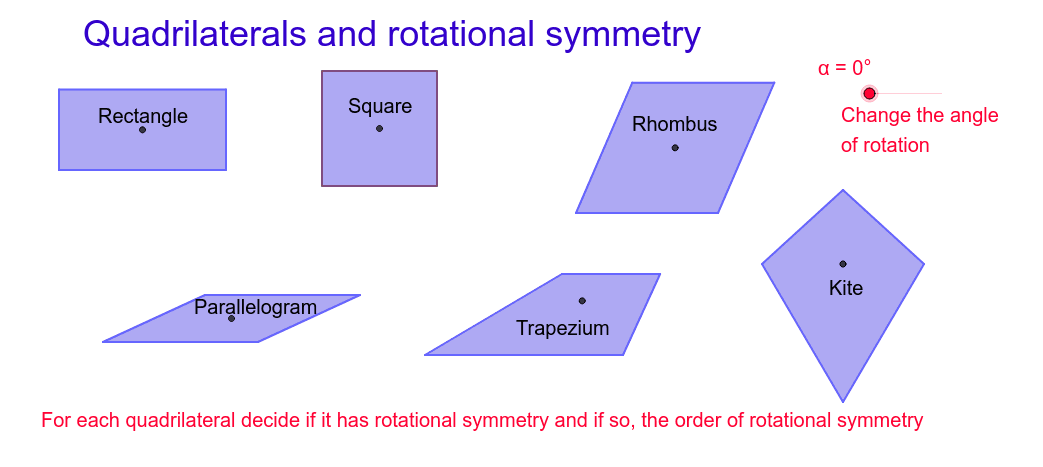
This example demonstrates the rotational symmetry of quadrilaterals. Key math concepts include symmetry, rotation angles, and geometric transformations. Construction involves commands like Segment, OrthogonalLine, Point, Intersect, Polygon, Circle, Line, Rotate, and Mirror. Suitable for middle school students and beyond for learning geometric transformations and symmetry, or for classroom demonstrations.
GeoGebra Commands & Parameters
Segment(A, B) → aOrthogonalLine(A, a) → bOrthogonalLine(B, a) → cPoint(b) → COrthogonalLine(C, b) → dIntersect(c, d) → DPolygon(C, D, B, A) → poly1, c_1, d_1, b_1, a_1Segment(C, B) → eSegment(D, A) → fIntersect(e, f) → EPolygon(F, G, 4) → poly2, f_1, g, h, i, H, ISegment(I, G) → jSegment(H, F) → kIntersect(j, k) → JSegment(K, L) → lCircle(K, L) → pPoint(p) → MSegment(K, M) → mLine(M, l) → nLine(L, m) → qIntersect(n, q) → NSegment(M, L) → rSegment(N, K) → sIntersect(r, s) → OPolygon(M, N, L, K) → poly3, m_1, n_1, l_1, k_1Rotate(C, (-α), E) → C'Rotate(D, (-α), E) → D'Rotate(B, (-α), E) → B'Rotate(A, (-α), E) → A'Polygon(C', D', B', A') → poly1', c', d', b', a'Rotate(M, (-α), O) → M'Rotate(N, (-α), O) → N'Rotate(L, (-α), O) → L'Rotate(K, (-α), O) → K'Polygon(M', N', L', K') → poly3', m', n', l', k'Segment(P, Q) → tSegment(P, R) → e_1Line(Q, e_1) → g_1Line(R, t) → h_1Intersect(g_1, h_1) → SPolygon(P, R, S, Q) → poly4, p_1, r_1, s_1, q_1Segment(R, Q) → i_1Segment(S, P) → j_1Intersect(i_1, j_1) → TRotate(P, (-α), T) → P'Rotate(R, (-α), T) → R'Rotate(S, (-α), T) → S'Rotate(Q, (-α), T) → Q'Polygon(P', R', S', Q') → poly4', p', r', s', q'Segment(U, V) → t_1Segment(U, W) → a_2Line(W, t_1) → b_2Point(b_2) → ZSegment(Z, V) → c_2Polygon(U, V, Z, W) → poly5, u, v, z, wSegment(W, V) → d_2Segment(Z, U) → e_2Intersect(d_2, e_2) → A_1Rotate(U, (-α), A_1) → U'Rotate(V, (-α), A_1) → V'Rotate(Z, (-α), A_1) → Z'Rotate(W, (-α), A_1) → W'Polygon(U', V', Z', W') → poly5', u', v', z', w'Line(B_1, C_1) → f_2Mirror(D_1, f_2) → E_1Polygon(D_1, B_1, E_1, C_1) → poly6, d_3, b_3, e_3, c_3Segment(D_1, E_1) → g_2Intersect(f_2, g_2) → F_1Rotate(D_1, (-α), F_1) → G_1Rotate(B_1, (-α), F_1) → H_1Rotate(E_1, (-α), F_1) → I_1Rotate(C_1, (-α), F_1) → J_1Polygon(G_1, H_1, I_1, J_1) → poly6', g_3, h_2, i_2, j_2Rotate(poly2, (-α), J) → poly2'
AI Drawing Prompt Reference
Draw a quadrilateral and rotate it by a fixed angle (e.g., negative alpha) about the intersection point of its diagonals, showing both the original and rotated shapes in different colors or line styles. Then draw another quadrilateral, rotate it similarly about its diagonal intersection, and label the rotation angle. Finally, construct a closed four-sided polygon and rotate it about its diagonal intersection to demonstrate rotational symmetry. Clearly mark all rotation centers and angles, ensuring accurate geometric relationships.
The prompt above was compiled from the original drawing commands and is for reference only.