
Rotational Symmetry of Quadrilaterals by Beverly Heigre
Loading the math board and drawing, please wait…
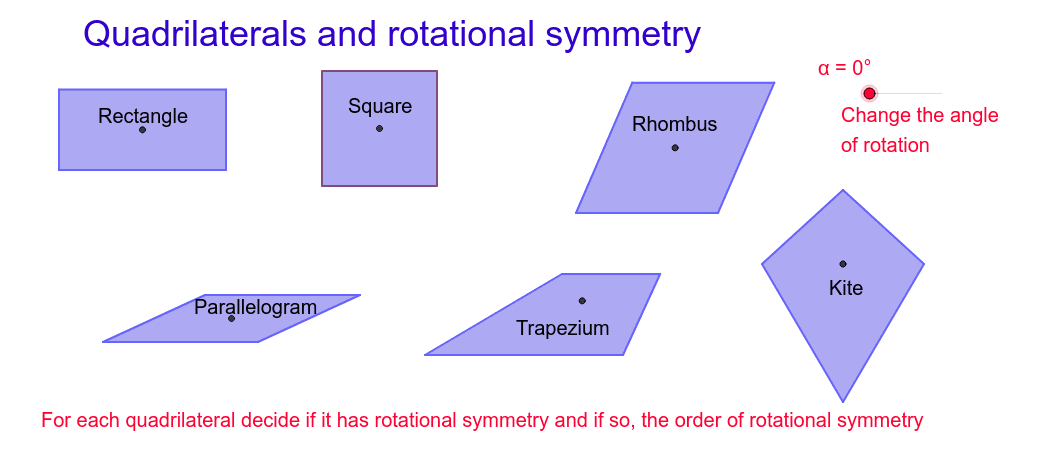
This GeoGebra example dynamically demonstrates the rotational symmetry of quadrilaterals, showing how different quadrilaterals (such as squares, rectangles, rhombi) coincide with their original shape after rotation by certain angles. The core mathematical concepts include rotational symmetry, center of rotation, angle of rotation, geometric transformations, and properties of polygons. The construction uses GeoGebra commands such as Segment, Polygon, Circle, Rotate, and Mirror to create the quadrilateral and its rotated copies, while OrthogonalLine, Intersect, and Point are used to determine the rotation center and symmetry axes. Additional objects like Line and Tangent Function enhance the analysis. This resource is suitable for middle and high school geometry classes, helping students grasp the idea of rotational symmetry and explore how different quadrilaterals exhibit varying degrees of symmetry, thereby fostering spatial reasoning and logical thinking.
GeoGebra Commands & Parameters
Segment(A, B) → aOrthogonalLine(A, a) → bOrthogonalLine(B, a) → cPoint(b) → COrthogonalLine(C, b) → dIntersect(c, d) → DPolygon(C, D, B, A) → poly1, c_1, d_1, b_1, a_1Segment(C, B) → eSegment(D, A) → fIntersect(e, f) → EPolygon(F, G, 4) → poly2, f_1, g, h, i, H, ISegment(I, G) → jSegment(H, F) → kIntersect(j, k) → JSegment(K, L) → lCircle(K, L) → pPoint(p) → MSegment(K, M) → mLine(M, l) → nLine(L, m) → qIntersect(n, q) → NSegment(M, L) → rSegment(N, K) → sIntersect(r, s) → OPolygon(M, N, L, K) → poly3, m_1, n_1, l_1, k_1Rotate(C, (-α), E) → C'Rotate(D, (-α), E) → D'Rotate(B, (-α), E) → B'Rotate(A, (-α), E) → A'Polygon(C', D', B', A') → poly1', c', d', b', a'Rotate(M, (-α), O) → M'Rotate(N, (-α), O) → N'Rotate(L, (-α), O) → L'Rotate(K, (-α), O) → K'Polygon(M', N', L', K') → poly3', m', n', l', k'Segment(P, Q) → tSegment(P, R) → e_1Line(Q, e_1) → g_1Line(R, t) → h_1Intersect(g_1, h_1) → SPolygon(P, R, S, Q) → poly4, p_1, r_1, s_1, q_1Segment(R, Q) → i_1Segment(S, P) → j_1Intersect(i_1, j_1) → TRotate(P, (-α), T) → P'Rotate(R, (-α), T) → R'Rotate(S, (-α), T) → S'Rotate(Q, (-α), T) → Q'Polygon(P', R', S', Q') → poly4', p', r', s', q'Segment(U, V) → t_1Segment(U, W) → a_2Line(W, t_1) → b_2Point(b_2) → ZSegment(Z, V) → c_2Polygon(U, V, Z, W) → poly5, u, v, z, wSegment(W, V) → d_2Segment(Z, U) → e_2Intersect(d_2, e_2) → A_1Rotate(U, (-α), A_1) → U'Rotate(V, (-α), A_1) → V'Rotate(Z, (-α), A_1) → Z'Rotate(W, (-α), A_1) → W'Polygon(U', V', Z', W') → poly5', u', v', z', w'Line(B_1, C_1) → f_2Mirror(D_1, f_2) → E_1Polygon(D_1, B_1, E_1, C_1) → poly6, d_3, b_3, e_3, c_3Segment(D_1, E_1) → g_2Intersect(f_2, g_2) → F_1Rotate(D_1, (-α), F_1) → G_1Rotate(B_1, (-α), F_1) → H_1Rotate(E_1, (-α), F_1) → I_1Rotate(C_1, (-α), F_1) → J_1Polygon(G_1, H_1, I_1, J_1) → poly6', g_3, h_2, i_2, j_2Rotate(poly2, (-α), J) → poly2'
AI Drawing Prompt Reference
Draw a quadrilateral demonstrating rotational symmetry. Include the center of rotation, rotation angle, and the rotated quadrilateral. The construction order is: first draw the quadrilateral, determine the rotation center, then rotate the vertices, and finally display the rotated figure to show how different quadrilaterals coincide with their original shape after rotation.
The prompt above was compiled from the original drawing commands and is for reference only.