
Rotational Symmetry: Intersection of Geometric Shapes and Function Graphs
Loading the math board and drawing, please wait…
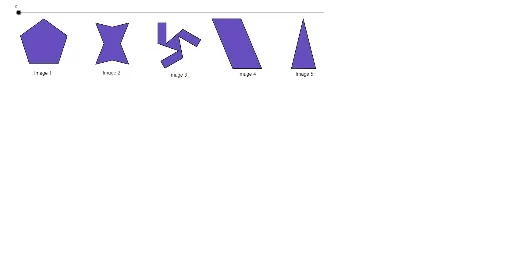
Rotational Symmetry is a geometric concept where a shape appears identical after rotation around a point. This example demonstrates its application in polygons and function graphs using GeoGebra. Key mathematical concepts include symmetry, rotation transformations, and graphing. Construction involves commands like Polygon, Rotate, Midpoint, and Intersect to analyze symmetric points. Suitable for middle school students learning geometric symmetry or high school students exploring the connection between functions and geometry.
GeoGebra Commands & Parameters
Polygon(A, B, 5) → poly1, a, b, c, d, e, C, D, EPolygon(F, N, G, M, H, O, J, L) → poly2, f, n, g, m, h, o, j, lSegment(I, K) → iSegment(K, P) → kSegment(P, Q) → pRotate(K, 240°, R) → K'Rotate(P, 240°, R) → P'Segment(K', P') → k'Rotate(K', 240°, R) → K''Rotate(P', 240°, R) → P''Segment(K'', P'') → k''Rotate(P, 240°, R) → P'_1Rotate(Q, 240°, R) → Q'Segment(P'_1, Q') → p'Rotate(I, 120°, R) → I'Rotate(K, 120°, R) → K'_1Segment(I', K'_1) → i'Rotate(I, 240°, R) → I'_1Rotate(K, 240°, R) → K'_2Segment(I'_1, K'_2) → i'_1Rotate(P, 120°, R) → P'_2Rotate(Q, 120°, R) → Q'_1Segment(P'_2, Q'_1) → p'_1Segment(I, Q'_1) → qSegment(Q, I'_1) → rSegment(Q', I') → sPolygon(K, P, Q'_1, I, Q, I'_1, K', P', Q', I', K'', P'') → poly3, k_1, p'', q'_1, i_1, p_1, q_1, i'_2, k'_1, p'_2, q', i'_3, k''_1Polygon(S, T, U, V) → poly4, s_1, t, u, vMidpoint(N, O) → WMidpoint(S, T) → ZMidpoint(S, V) → A_1Line(A_1, s_1) → a_1Line(Z, t) → b_1Intersect(a_1, b_1) → B_1OrthogonalLine(D, a) → c_1OrthogonalLine(C, e) → d_1Intersect(c_1, d_1) → C_1Rotate(poly1, w°, C_1) → poly1'Rotate(F, w°, W) → F'Rotate(N, w°, W) → N'Rotate(G, w°, W) → G'Rotate(M, w°, W) → M'Rotate(H, w°, W) → H'Rotate(O, w°, W) → O'Rotate(J, w°, W) → J'Rotate(L, w°, W) → L'Polygon(F', N', G', M', H', O', J', L') → poly2', f', n', g', m', h', o', j', l'Rotate(K, w°, R) → K'_3Rotate(P, w°, R) → P'_3Rotate(Q, w°, R) → Q'_2Rotate(I'_1, w°, R) → D_1Rotate(K', w°, R) → K''_1Rotate(P', w°, R) → P''_1Rotate(Q', w°, R) → Q''Rotate(I', w°, R) → I''Rotate(K'', w°, R) → K'''Rotate(P'', w°, R) → P'''Rotate(Q'_1, w°, R) → E_1Rotate(I, w°, R) → I'_2Polygon(K'_3, P'_3, E_1, I'_2, Q'_2, D_1, K''_1, P''_1, Q'', I'', K''', P''') → poly3', k'_3, p''', e_1, i'_4, p'_3, q'_2, d_2, k''_2, p''_1, q'', i'', k'''Rotate(S, w°, B_1) → S'Rotate(T, w°, B_1) → T'Rotate(U, w°, B_1) → U'Rotate(V, w°, B_1) → V'Polygon(S', T', U', V') → poly4', s', t', u', v'Polygon(F_1, G_1, H_1) → poly5, h_1, f_1, g_1OrthogonalLine(G_1, g_1) → j_1Intersect(j_1, g_1) → I_1Midpoint(I_1, G_1) → J_1Rotate(F_1, w°, J_1) → K_1Rotate(G_1, w°, J_1) → L_1Rotate(H_1, w°, J_1) → M_1Polygon(K_1, L_1, M_1) → poly5', m_1, k_2, l_1
AI Drawing Prompt Reference
Draw a polygon with rotational symmetry. First, create a pentagon, then rotate its sides and vertices around a central point to form multiple symmetric polygons. Next, draw another pentagon and rotate it around a specific point to form another symmetric polygon. Finally, use rotation and symmetry operations to generate a series of polygons with rotational symmetry.
The prompt above was compiled from the original drawing commands and is for reference only.