
Construction and Verification of Rotational Symmetry
Loading the math board and drawing, please wait…
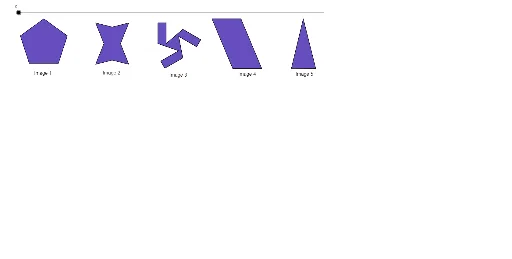
This example demonstrates how to construct a geometric figure with rotational symmetry using GeoGebra. Create an initial polygon (poly1) with the Polygon tool, then use the Rotate command to generate a symmetric counterpart (poly2) around a specified center. Verify the rotational invariance using Midpoint, Line, OrthogonalLine, and Intersect tools. Key commands: Polygon, Rotate, Midpoint, Line, OrthogonalLine, Intersect. Suitable for middle and high school mathematics courses covering geometric transformations, helping students understand rotational symmetry, center of rotation, angles, and symmetry properties while developing spatial reasoning skills.
GeoGebra Commands & Parameters
Polygon(A, B, 5) → poly1, a, b, c, d, e, C, D, EPolygon(F, N, G, M, H, O, J, L) → poly2, f, n, g, m, h, o, j, lSegment(I, K) → iSegment(K, P) → kSegment(P, Q) → pRotate(K, 240°, R) → K'Rotate(P, 240°, R) → P'Segment(K', P') → k'Rotate(K', 240°, R) → K''Rotate(P', 240°, R) → P''Segment(K'', P'') → k''Rotate(P, 240°, R) → P'_1Rotate(Q, 240°, R) → Q'Segment(P'_1, Q') → p'Rotate(I, 120°, R) → I'Rotate(K, 120°, R) → K'_1Segment(I', K'_1) → i'Rotate(I, 240°, R) → I'_1Rotate(K, 240°, R) → K'_2Segment(I'_1, K'_2) → i'_1Rotate(P, 120°, R) → P'_2Rotate(Q, 120°, R) → Q'_1Segment(P'_2, Q'_1) → p'_1Segment(I, Q'_1) → qSegment(Q, I'_1) → rSegment(Q', I') → sPolygon(K, P, Q'_1, I, Q, I'_1, K', P', Q', I', K'', P'') → poly3, k_1, p'', q'_1, i_1, p_1, q_1, i'_2, k'_1, p'_2, q', i'_3, k''_1Polygon(S, T, U, V) → poly4, s_1, t, u, vMidpoint(N, O) → WMidpoint(S, T) → ZMidpoint(S, V) → A_1Line(A_1, s_1) → a_1Line(Z, t) → b_1Intersect(a_1, b_1) → B_1OrthogonalLine(D, a) → c_1OrthogonalLine(C, e) → d_1Intersect(c_1, d_1) → C_1Rotate(poly1, w°, C_1) → poly1'Rotate(F, w°, W) → F'Rotate(N, w°, W) → N'Rotate(G, w°, W) → G'Rotate(M, w°, W) → M'Rotate(H, w°, W) → H'Rotate(O, w°, W) → O'Rotate(J, w°, W) → J'Rotate(L, w°, W) → L'Polygon(F', N', G', M', H', O', J', L') → poly2', f', n', g', m', h', o', j', l'Rotate(K, w°, R) → K'_3Rotate(P, w°, R) → P'_3Rotate(Q, w°, R) → Q'_2Rotate(I'_1, w°, R) → D_1Rotate(K', w°, R) → K''_1Rotate(P', w°, R) → P''_1Rotate(Q', w°, R) → Q''Rotate(I', w°, R) → I''Rotate(K'', w°, R) → K'''Rotate(P'', w°, R) → P'''Rotate(Q'_1, w°, R) → E_1Rotate(I, w°, R) → I'_2Polygon(K'_3, P'_3, E_1, I'_2, Q'_2, D_1, K''_1, P''_1, Q'', I'', K''', P''') → poly3', k'_3, p''', e_1, i'_4, p'_3, q'_2, d_2, k''_2, p''_1, q'', i'', k'''Rotate(S, w°, B_1) → S'Rotate(T, w°, B_1) → T'Rotate(U, w°, B_1) → U'Rotate(V, w°, B_1) → V'Polygon(S', T', U', V') → poly4', s', t', u', v'Polygon(F_1, G_1, H_1) → poly5, h_1, f_1, g_1OrthogonalLine(G_1, g_1) → j_1Intersect(j_1, g_1) → I_1Midpoint(I_1, G_1) → J_1Rotate(F_1, w°, J_1) → K_1Rotate(G_1, w°, J_1) → L_1Rotate(H_1, w°, J_1) → M_1Polygon(K_1, L_1, M_1) → poly5', m_1, k_2, l_1