
Rotational Sculpture
Loading the math board and drawing, please wait…
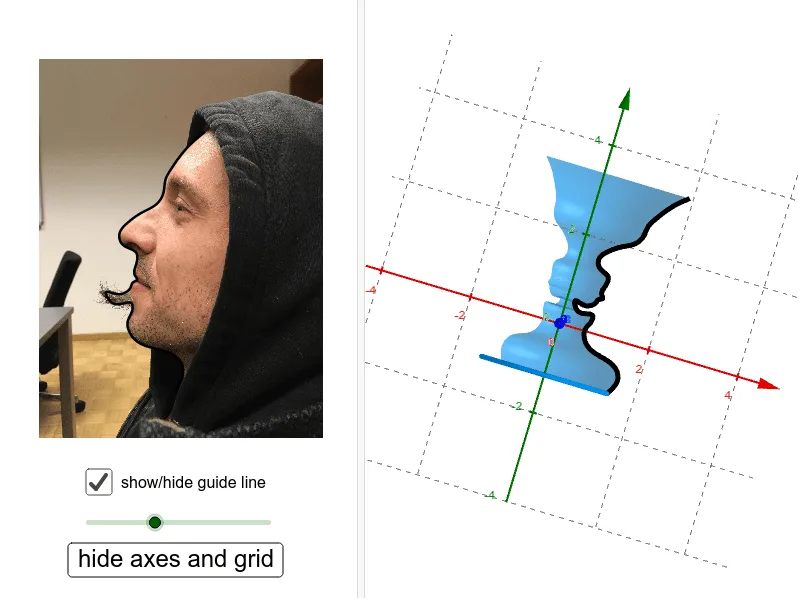
This example demonstrates the generation of a three-dimensional rotational solid by rotating a two-dimensional shape. Core mathematical concepts include rotation, volume calculation, expected value, and analytical geometry. Construction highlights from the GeoGebra command summary involve commands like Spline, CurveCartesian, OrthogonalPlane, OrthogonalLine, Intersect, Segment, Circle, Surface, Center, Rotate, CircleSector, CircleArc, and objects such as C, J_1, J_2, etc. It is suitable for high school students and mathematics enthusiasts to understand the construction of rotational solids and volume calculations, as well as for visualizing expected value in statistics education.
GeoGebra Commands & Parameters
Spline({A, B, B_1, B_2, B_3, C, C_1, C_2, C_3, D, D_1, D_2, D_3, E, E_1, E_2, E_3, E_4, F, F_1, F_2, F_3, G, H, I, J, J_1, J_2, J_3, U}, 3) → aCurveCartesian(a(t / d), t, 0, d) → cOrthogonalPlane(U, yAxis) → eOrthogonalLine(U, yAxis, xOyPlane) → fIntersect(f, yAxis) → VSegment(V, U) → gCircle(V, g, yAxis) → hSurface(c, α, yAxis) → bCenter(h) → KRotate(U, α, yAxis) → U'CircleSector(K, U', U, xOyPlane) → kCircleArc(V, U', U, xOyPlane) → p
AI Drawing Prompt Reference
Create a three-dimensional rotational solid generated by rotating a two-dimensional shape. Start by plotting a series of points, then use these points to create a cubic spline curve. Generate a rotational surface based on this curve. Construct a plane perpendicular to the y-axis and a line perpendicular to the xOy plane, and find their intersection point. Use these points to create circles, a center, arcs, and sectors, ultimately forming a complex rotational solid structure.
The prompt above was compiled from the original drawing commands and is for reference only.