
Rotation Tessellation
Loading the math board and drawing, please wait…
In collections
Rotation Tessellation
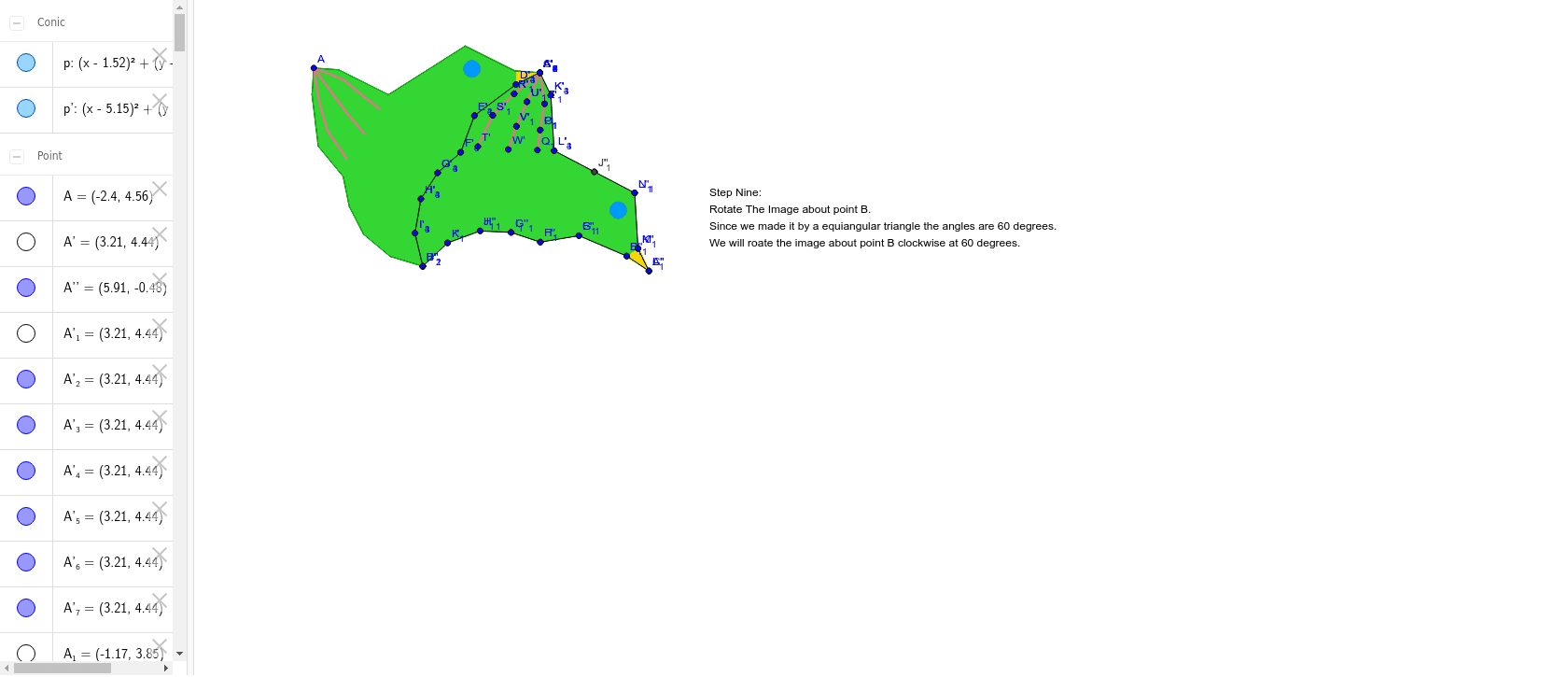
This example demonstrates the construction process of a rotation tessellation. Key mathematical concepts include rotation transformation and polygons. Using GeoGebra commands such as Polygon, Segment, Rotate, Midpoint, and Circle, a rotation tessellation can be constructed. Suitable for middle school and above students to learn about geometric transformations and tessellations.
GeoGebra Commands & Parameters
Polygon(A, B, 3) → poly1, a, b, c, CSegment(A, D) → dSegment(D, E) → eSegment(E, F) → fSegment(F, G) → gSegment(G, H) → hSegment(H, I) → iSegment(I, B) → jRotate(A, 300*°, B) → A'Rotate(D, 300*°, B) → D'Segment(A', D') → d'Rotate(D, 300*°, B) → D'_1Rotate(E, 300*°, B) → E'Segment(D'_1, E') → e'Rotate(E, 300*°, B) → E'_1Rotate(F, 300*°, B) → F'Segment(E'_1, F') → f'Rotate(F, 300*°, B) → F'_1Rotate(G, 300*°, B) → G'Segment(F'_1, G') → g'Rotate(G, 300*°, B) → G'_1Rotate(H, 300*°, B) → H'Segment(G'_1, H') → h'Rotate(H, 300*°, B) → H'_1Rotate(I, 300*°, B) → I'Segment(H'_1, I') → i'Rotate(I, 300*°, B) → I'_1Rotate(B, 300*°, B) → B'Segment(I'_1, B') → j'Midpoint(A, C) → JSegment(A, K) → kSegment(K, L) → lSegment(L, J) → mRotate(A, 180*°, J) → A'_1Rotate(K, 180*°, J) → K'Segment(A'_1, K') → k'Rotate(K, 180*°, J) → K'_1Rotate(L, 180*°, J) → L'Segment(K'_1, L') → l'Rotate(L, 180*°, J) → L'_1Rotate(J, 180*°, J) → J'Segment(L'_1, J') → m'Polygon(A, D, G', F'_1, E', D', C, K'_1, L', L, K, E, F, G, H, I, B, I'_1, H') → poly2, a_1, h'_1, g'_1, f'_1, e'_1, d'_1, c_1, k'_1, l'_1, l_1, k_1, d_1, e_1, f_1, g_1, h_1, i_1, b_1, i'_1Polygon(M, N, O) → poly3, o, m_1, nCircle(P, Q) → pSegment(A, R) → qSegment(R, S) → rSegment(S, T) → sSegment(A, U) → tSegment(U, V) → j_1Segment(V, W) → n_1Segment(A, Z) → p_1Segment(Z, A_1) → q_1Segment(A_1, B_1) → r_1Rotate(A, -60*°, B) → A'_2Rotate(D, -60*°, B) → D'_2Rotate(E, -60*°, B) → E'_2Rotate(F, -60*°, B) → F'_2Rotate(G, -60*°, B) → G'_2Rotate(H, -60*°, B) → H'_2Rotate(I, -60*°, B) → I'_2Rotate(B, -60*°, B) → B'_1Rotate(I'_1, -60*°, B) → C_1Rotate(H', -60*°, B) → H''Rotate(G', -60*°, B) → G''Rotate(F'_1, -60*°, B) → D_1Rotate(E', -60*°, B) → E''Rotate(D', -60*°, B) → D''Rotate(C, -60*°, B) → C'Rotate(K'_1, -60*°, B) → E_1Rotate(L', -60*°, B) → L''Rotate(L, -60*°, B) → L'_2Rotate(K, -60*°, B) → K'_2Polygon(A'_2, D'_2, G'', D_1, E'', D'', C', E_1, L'', L'_2, K'_2, E'_2, F'_2, G'_2, H'_2, I'_2, B'_1, C_1, H'') → poly2', a'_2, h'', g'', d_2, e'', d'', c', e_2, l'', l'_2, k'_2, d'_2, e'_2, f'_2, g'_2, h'_2, i'_2, b'_1, c_2Rotate(M, -60*°, B) → M'Rotate(N, -60*°, B) → N'Rotate(O, -60*°, B) → O'Polygon(M', N', O') → poly3', o', m'_1, n'Rotate(p, -60*°, B) → p'Rotate(A, -60*°, B) → A'_3Rotate(D, -60*°, B) → D'_3Segment(A'_3, D'_3) → d'_3Rotate(D, -60*°, B) → D'_4Rotate(E, -60*°, B) → E'_3Segment(D'_4, E'_3) → e'_3Rotate(E, -60*°, B) → E'_4Rotate(F, -60*°, B) → F'_3Segment(E'_4, F'_3) → f'_3Rotate(F, -60*°, B) → F'_4Rotate(G, -60*°, B) → G'_3Segment(F'_4, G'_3) → g'_3Rotate(G, -60*°, B) → G'_4Rotate(H, -60*°, B) → H'_3Segment(G'_4, H'_3) → h'_3Rotate(H, -60*°, B) → H'_4Rotate(I, -60*°, B) → I'_3Segment(H'_4, I'_3) → i'_3Rotate(I, -60*°, B) → I'_4Rotate(B, -60*°, B) → B'_2Segment(I'_4, B'_2) → j'_1Rotate(A', -60*°, B) → A''Rotate(D', -60*°, B) → D''_1Segment(A'', D''_1) → d''_1Rotate(D'_1, -60*°, B) → F_1Rotate(E', -60*°, B) → E''_1Segment(F_1, E''_1) → e''_1Rotate(E'_1, -60*°, B) → G_1Rotate(F', -60*°, B) → F''Segment(G_1, F'') → f''Rotate(F'_1, -60*°, B) → H_1Rotate(G', -60*°, B) → G''_1Segment(H_1, G''_1) → g''_1Rotate(G'_1, -60*°, B) → I_1Rotate(H', -60*°, B) → H''_1Segment(I_1, H''_1) → h''_1Rotate(H'_1, -60*°, B) → J_1Rotate(I', -60*°, B) → I''Segment(J_1, I'') → i''Rotate(I'_1, -60*°, B) → K_1Rotate(B', -60*°, B) → B''Segment(K_1, B'') → j''Rotate(A, -60*°, B) → A'_4Rotate(K, -60*°, B) → K'_3Segment(A'_4, K'_3) → k'_3Rotate(K, -60*°, B) → K'_4Rotate(L, -60*°, B) → L'_3Segment(K'_4, L'_3) → l'_3Rotate(L, -60*°, B) → L'_4Rotate(J, -60*°, B) → J'_1Segment(L'_4, J'_1) → m'_2Rotate(A'_1, -60*°, B) → L_1Rotate(K', -60*°, B) → K''Segment(L_1, K'') → k''Rotate(K'_1, -60*°, B) → M_1Rotate(L', -60*°, B) → L''_1Segment(M_1, L''_1) → l''_1Rotate(L'_1, -60*°, B) → N_1Rotate(J', -60*°, B) → J''Segment(N_1, J'') → m''Rotate(A, -60*°, B) → A'_5Rotate(R, -60*°, B) → R'Segment(A'_5, R') → q'Rotate(R, -60*°, B) → R'_1Rotate(S, -60*°, B) → S'Segment(R'_1, S') → r'Rotate(S, -60*°, B) → S'_1Rotate(T, -60*°, B) → T'Segment(S'_1, T') → s'Rotate(A, -60*°, B) → A'_6Rotate(U, -60*°, B) → U'Segment(A'_6, U') → t'Rotate(U, -60*°, B) → U'_1Rotate(V, -60*°, B) → V'Segment(U'_1, V') → s_1Rotate(V, -60*°, B) → V'_1Rotate(W, -60*°, B) → W'Segment(V'_1, W') → t_1Rotate(A, -60*°, B) → A'_7Rotate(Z, -60*°, B) → Z'Segment(A'_7, Z') → a_2Rotate(Z, -60*°, B) → Z'_1Rotate(A_1, -60*°, B) → O_1Segment(Z'_1, O_1) → b_2Rotate(A_1, -60*°, B) → P_1Rotate(B_1, -60*°, B) → Q_1Segment(P_1, Q_1) → f_2
AI Drawing Prompt Reference
Draw a rotation tessellation by starting with a hexagon, then rotate it 300 degrees around one vertex, and continue rotating each vertex 300 degrees while connecting adjacent vertices to form multiple rotated hexagons, finally combining them into a complete tessellation pattern.
The prompt above was compiled from the original drawing commands and is for reference only.