
Rotation of a Curve around the x-axis
Loading the math board and drawing, please wait…
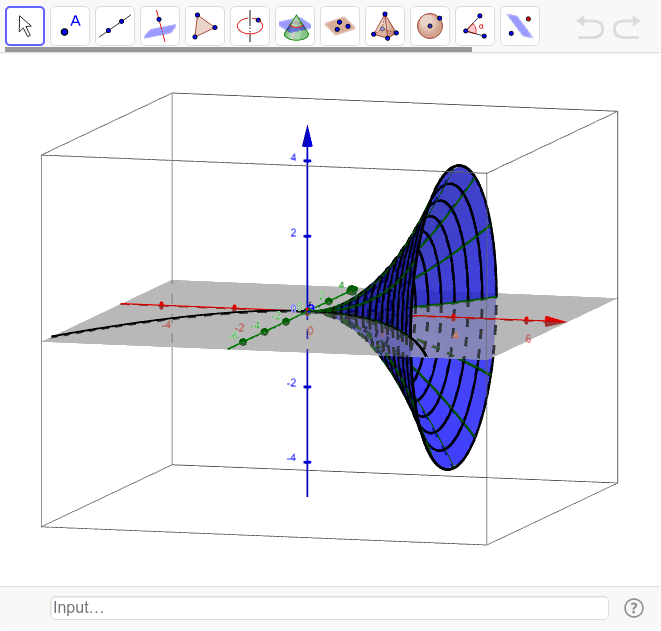
This GeoGebra example demonstrates the dynamic construction of a solid of revolution by rotating a plane curve around the x-axis. It visually illustrates how a 2D function graph sweeps out a 3D surface, helping learners grasp the concept of volume of revolution. Core mathematical concepts include definite integrals (disk/washer method), parametric surface representation, and the relationship between a curve and its rotated solid. The construction uses the Surface command to define the rotated surface via parametric equations, Sequence to generate cross-sectional circles or guide points, and a Textfield (input box) along with a slider (parameter a) to interactively adjust the curve or rotation angle. This is ideal for high school seniors or early university calculus students studying applications of integration, 3D geometry, and visualization of solids.
GeoGebra Commands & Parameters
Surface(t, (f(t) * cos(u)), (f(t) * sin(u)), t, 0, 4, u, 0, 6.283185307179586) → aSequence(CurveCartesian[t, (f(t) * cos(u)), (f(t) * sin(u)), u, 0, 6.283185307179586], t, 0, 4, 0.25) → list1Sequence(CurveCartesian[t, (f(t) * cos(u)), (f(t) * sin(u)), t, 0, 4], u, 0, 6.283185307179586, 0.5235987755982988) → list2Textfield(f) → inputBox1
AI Drawing Prompt Reference
Create a 3D coordinate system with the x-axis extending horizontally. Above the x-axis, draw a plane curve defined on the interval from 0 to 4, whose shape can be adjusted interactively via an input field. Rotate this curve around the x-axis to generate a solid of revolution, with its surface rendered as a semi-transparent parametric surface. On this solid, overlay two sets of grid lines: one set consists of equally spaced circular cross-sections along the x-axis, and the other set consists of longitudinal curves spaced at equal angular intervals around the axis, forming a clear mesh. Include a slider to control the rotation angle or curve shape, visually demonstrating how the solid is swept out.
The prompt above was compiled from the original drawing commands and is for reference only.