
Rotation by Mr Hardin
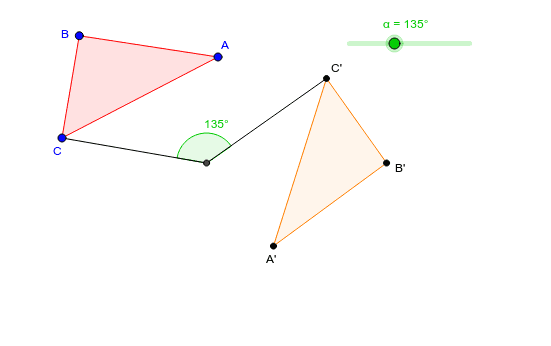
Loading the math board and drawing, please wait…
In collections
translation along a vector
This example demonstrates how to perform rotation transformations using GeoGebra. Key mathematical concepts include geometric transformations and angles. Using commands like Polygon, Intersect, Rotate, Segment, and Angle, the construction of rotated figures is illustrated. Suitable for students at the junior high school level and above.
GeoGebra Commands & Parameters
Polygon(A, B, C) → poly1, c, a, bIntersect(xAxis, yAxis) → DRotate(A, (-α), D) → A'Rotate(B, (-α), D) → B'Rotate(C, (-α), D) → C'Polygon(A', B', C') → poly1', c', a', b'Segment(D, C') → dSegment(D, C) → eAngle(C', D, C) → β
AI Drawing Prompt Reference
Draw a figure that includes an original triangle and a rotated triangle. The construction order is: first draw the original triangle, then find the intersection of the x-axis and y-axis as the rotation center, then rotate the three vertices of the original triangle around the rotation center by a certain angle to obtain the rotated triangle. Next, draw line segments from the rotation center to the rotated vertices and from the rotation center to the original vertices, and finally measure the angle formed by the rotated vertex, the rotation center, and the original vertex. This figure illustrates the concept of rotation transformation, suitable for junior high school students.
The prompt above was compiled from the original drawing commands and is for reference only.