
Rotation Body III
Loading the math board and drawing, please wait…
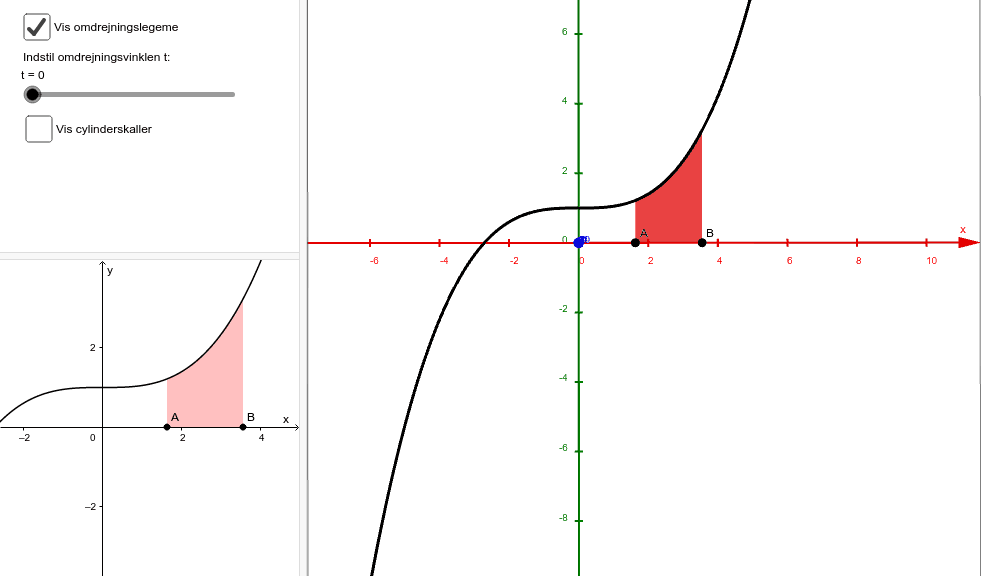
This example demonstrates the rotation of a body around the y-axis. It involves solid geometry and rotation transformation. Using GeoGebra commands such as Point, Ray, Sequence, Surface, etc., students can intuitively understand the process of generating a rotation body.
GeoGebra Commands & Parameters
Point(xAxis) → ARay(A, E) → aPoint(a) → BSequence(A + ((B - A) * ((2 * i) - 1) / ((2 * n))), i, 1, n) → punkterRectangleSum(f, x(A), x(B), n, 0.5) → middelsumDistance(A, B) → dSequence(Surface[((x(punkter(i)) + d / ((2 * n))) * cos(v)), u, ((x(punkter(i)) + d / ((2 * n))) * sin(v)), u, 0, f(x(punkter(i))), v, 0, t], i, 1, n) → indersiderSequence(Surface[((x(punkter(i)) - d / ((2 * n))) * cos(v)), u, ((x(punkter(i)) - d / ((2 * n))) * sin(v)), u, 0, f(x(punkter(i))), v, 0, t], i, 1, n) → ydersiderSequence(Surface[(u * cos(v)), f(x(punkter(i))), (u * sin(v)), u, x(punkter(i)) - d / ((2 * n)), x(punkter(i)) + d / ((2 * n)), v, 0, t], i, 1, n) → toppeSurface((u * cos(v)), 0, (u * sin(v)), u, x(A), x(B), v, 0, t) → list5Integral(f, x(A), x(B)) → integralSequence(Rotate[Polygon[punkter(i) - (d / ((2 * n)), 0), punkter(i) + (d / ((2 * n)), 0), punkter(i) + (d / ((2 * n)), f(punkter(i))), punkter(i) + (((-d)) / ((2 * n)), f(punkter(i)))], (-t), yAxis], i, 1, n) → rotmiddelsummerSurface((cos(t) * u), (v * f(u)), (sin(t) * u), u, x(A), x(B), v, 0, 1) → punktmaengdeSurface((u * cos(v)), f(u), (u * sin(v)), u, x(A), x(B), v, 0, t) → omdrejningSurface((x(B) * cos(v)), u, (x(B) * sin(v)), u, 0, f(x(B)), v, 0, t) → ydersideSurface((x(A) * cos(v)), u, (x(A) * sin(v)), u, 0, f(x(A)), v, 0, t) → indersideSurface((u * cos(v)), 0, (u * sin(v)), u, x(A), x(B), v, 0, t) → bund
AI Drawing Prompt Reference
Create a solid body rotated around the y-axis. Start by creating a point A on the x-axis, then draw a ray a from A. Create another point B on the ray. Generate a sequence of points to form the middle and top surfaces of a rectangle. Finally, use rotation and surface commands to create the side and top surfaces of the rotated body.
The prompt above was compiled from the original drawing commands and is for reference only.