
Rotation Animation of Parallelogram
Loading the math board and drawing, please wait…
In collections
Congruence (CO) Cluster
Congruence (Vol 2)
CCSS High School: Geometry (Congruence) Volume 2
CCSS High School: Geometry (Congruence) Volume 2
CCSS High School: Geometry (Congruence) Volume 2
Geometry (Congruence) Volume 2
CCSS High School: Geometry (Congruence) Volume 2
CCSS High School: Geometry (Congruence) Volume 2
CCSS High School: Geometry (Congruence) Volume 2
CCSS High School: Geometry (Congruence) Volume 2
CCSS High School: Geometry (Congruence) Volume 2
CCSS High School: Geometry (Congruence) Volume 2
CCSS High School: Geometry (Congruence) Volume 2
Gail LeBlancCCSS High School: Geometry (Congruence) Volume 2
CCSS High School: Geometry (Congruence) Volume 2
Parallel Lines and Planes
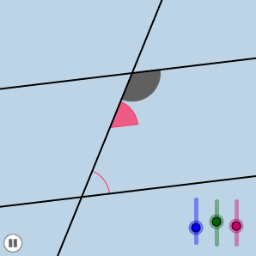
This example demonstrates a rotation animation of a parallelogram. Key mathematical concepts include angles, straight lines, and rotation. Using GeoGebra commands such as Point, Rotate, Angle, Line, etc., dynamic geometric figures can be constructed. Suitable for middle school and above students to learn geometric transformations and dynamic geometry.
GeoGebra Commands & Parameters
Point(a) → BRotate(B, α, A) → B'Angle(B, A, B') → βLine(A, B') → bCircle(A, 1) → eIntersect(b, d) → CCircle(C, 1) → fIntersect(e, a) → D, EIntersect(e, b) → F, GIntersect(f, b) → H, IIntersect(f, d) → J, KCircleSector(C, K, I) → gCircleSector(C, I, J) → hCircleSector(C, J, H) → kCircleSector(C, H, K) → pCircleSector(A, E, G) → qCircleSector(A, G, D) → rDilate(A, If[0 < i < 1, 1 - i], C) → A'Vector(A, A') → uTranslate(q, u) → q'Translate(r, u) → r'CircleArc(A, E, G) → c_1CircleArc(A, G, D) → f_1