
Rotation Animation of a Rhombus
Loading the math board and drawing, please wait…
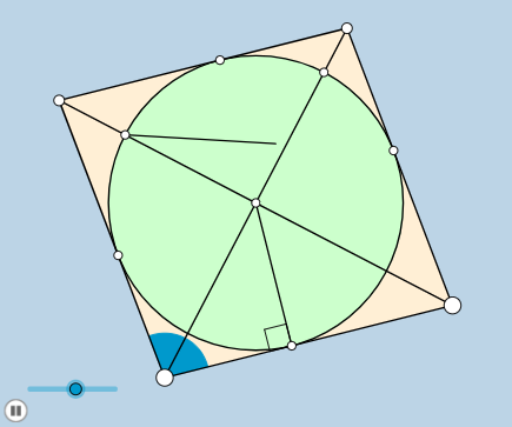
This example demonstrates a rotation animation of a rhombus, involving key mathematical concepts such as angles and geometric transformations. Using GeoGebra commands like Rotate, Ray, and Circle, a dynamic rotation effect of the rhombus can be constructed. Suitable for students at the junior high school level and above to learn about geometric transformations and random experiments.
GeoGebra Commands & Parameters
Rotate(B, (a * π / 180), A) → B'Ray(A, B') → jCircle(A, B) → cIntersect(c, j) → E,Line(B, E) → mSegment(A, B) → fCircle(B, f) → hCircle(E, f) → dIntersect(d, h, 1) → CLine(A, C) → lIntersect(l, m) → DSegment(E, C) → iOrthogonalLine(D, i) → nIntersect(n, i) → FCircle(D, F) → pIntersect(p, l) → L, MIntersect(p, m) → H, IAngle(M, D, F) → ζCircle(B, f) → eAngle(B, A, B') → αSegment(A, E) → gSegment(B, C) → kIntersect(n, f) → GAngle(D, G, A) → βOrthogonalLine(D, k) → qIntersect(k, q) → JSegment(I, J) → rOrthogonalLine(D, g) → sIntersect(g, s) → KSegment(K, M) → tIntersect(t, r) → NSegment(D, A) → bSegment(I, D) → f_1Segment(J, N) → g_1Segment(N, M) → h_1Min({f_1, b, g_1, h_1}) → oCircle(D, (0.3 * o)) → c_1Rotate(I, 45°, D) → I'Angle(I, D, I') → γRay(D, I') → i_1Intersect(c_1, b, 1) → OIntersect(c_1, i_1, 1) → PDilate(A, If[0 < u ≤ 1, 1 - u, 0], B) → A'Segment(A, A') → j_1Rotate(A, If[1 < u ≤ 2, ((u - 1) * α), α], A) → A'_1Rotate(A', If[1 < u ≤ 2, ((u - 1) * α), α], A) → A''Segment(A'_1, A'') → k_1Rotate(A'_1, If[2 < u ≤ 3, ((u - 2) * (π - α)), π - α], A) → QRotate(A'_1, If[2 < u ≤ 3, ((u - 2) * (π - α)), π - α], E) → RRotate(A'', If[2 < u ≤ 3, ((u - 2) * (π - α)), π - α], E) → A'''_1Segment(R, A'''_1) → m_1Rotate(R, If[3 < u ≤ 4, ((u - 3) * α), α], C) → R'Rotate(A'''_1, If[3 < u ≤ 4, ((u - 3) * α), α], C) → SSegment(R', S) → l_1Polygon(A, B, C, E) → poly1, r_1, s_1, t_1, a_1Segment(A'', I) → n_1Segment(E, D) → p_1Circle(A, (0.15 * f)) → d_1Segment(A, A'') → q_1Intersect(d_1, q_1) → T,Intersect(d_1, f) → U,CircleSector(A, U, T) → e_1Dilate(A, If[4 < u ≤ 5, 5 - u, 0], D) → A'_2Dilate(E, If[4 < u ≤ 5, 5 - u, 0], D) → E'Segment(A, A'_2) → b_1Segment(A'', E') → f_2Dilate(D, If[5 < u ≤ 6, 6 - u, 0], B) → D'Dilate(D, If[5 < u ≤ 6, 6 - u, 0], C) → D'_1Segment(D, D') → g_2Segment(D, D'_1) → h_2Dilate(D, If[6 < u ≤ 7, 7 - u, 0], G) → D'_2Segment(D, D'_2) → i_2Angle(G, D, J) → δAngle(J, D, M) → εAngle(I, D, K) → ρAngle(K, D, G) → θRotate(G, If[7 < u ≤ 8, ((u - 7) * δ), δ], D) → G'CircleArc(D, G, G') → c_2Rotate(J, If[8 < u ≤ 9, ((u - 8) * ε), ε], D) → J'CircleArc(D, J, J') → d_2Rotate(M, If[9 < u ≤ 10, ((u - 9) * ζ), ζ], D) → M'CircleArc(D, M, M') → e_2Angle(F, D, A'') → ηRotate(F, If[10 < u ≤ 11, ((u - 10) * η), η], D) → F'CircleArc(D, F, F') → k_2Rotate(I, If[11 < u ≤ 12, ((u - 11) * ρ), ρ], D) → I'_1CircleArc(D, I, I'_1) → p_2Rotate(K, If[12 < u ≤ 13, ((u - 12) * θ), θ], D) → K'CircleArc(D, K, K') → q_2Dilate(I, If[6 < u ≤ 7, 7 - u, 0], G) → I'_2Dilate(I, If[13 < u ≤ 14, 14 - u, 0], J) → I'_3Segment(I, I'_3) → j_2Dilate(K, If[14 < u ≤ 15, 15 - u, 0], N) → K'_1Segment(K, K'_1) → l_2Dilate(N, If[15 < u ≤ 16, 16 - u, 0], M) → N'Segment(N, N') → m_2Ray(D, P) → n_2Segment(A, A'') → r_2Intersect(r_2, n_2) → VDilate(D, If[16 < u ≤ 17, 17 - u, 0], V) → O'Segment(D, O') → s_2Rotate(O, If[17 < u ≤ 18, ((-(u - 17)) * π / 4), ((-π)) / 4], D) → O'_1CircleSector(D, O'_1, O) → t_2Rotate(t_2, If[19 < u ≤ 20, ((-(u - 19)) * π / 4), ((-π)) / 4], D) → c_3Line(N, g_2) → a_2Point(a_2) → WAngle(J, N, W) → τDilate(D, If[21 < u ≤ 22, 22 - u, 0], N) → D'_3Vector(D, D'_3) → wTranslate(c_3, w) → d_3Rotate(d_3, If[22 < u ≤ 23, ((-(u - 22)) * τ), (-τ)], N) → e_3
AI Drawing Prompt Reference
Draw a rhombus and create a rotation animation around a point. First, create a rhombus, then use the rotation command to rotate the rhombus around one of its vertices, forming an animation effect. Key objects include the vertices of the rhombus, the rotation center point, and the rotation angle. By adjusting the angle parameter, you can observe the dynamic rotation of the rhombus.
The prompt above was compiled from the original drawing commands and is for reference only.