
Rotation Animation of a Cube
Loading the math board and drawing, please wait…
In collections
Congruence (CO) Cluster
Congruence (Vol 2)
CCSS High School: Geometry (Congruence) Volume 2
CCSS High School: Geometry (Congruence) Volume 2
CCSS High School: Geometry (Congruence) Volume 2
Geometry (Congruence) Volume 2
CCSS High School: Geometry (Congruence) Volume 2
CCSS High School: Geometry (Congruence) Volume 2
CCSS High School: Geometry (Congruence) Volume 2
CCSS High School: Geometry (Congruence) Volume 2
CCSS High School: Geometry (Congruence) Volume 2
CCSS High School: Geometry (Congruence) Volume 2
CCSS High School: Geometry (Congruence) Volume 2
Gail LeBlancCCSS High School: Geometry (Congruence) Volume 2
CCSS High School: Geometry (Congruence) Volume 2
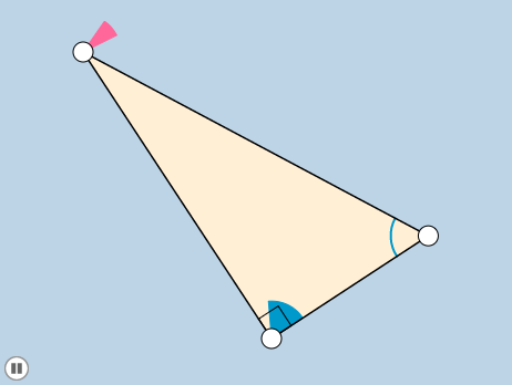
This example demonstrates a rotation animation of a cube, involving angles, trigonometric functions, and transformations. Using GeoGebra commands such as Rotate, Dilate, and Translate, the dynamic display of the cube's rotation and scaling is shown. Suitable for high school mathematics teaching, particularly in solid geometry and transformations.
GeoGebra Commands & Parameters
Line(A, B) → fOrthogonalLine(B, f) → gCircle(B, 1) → cIntersect(c, g, 2) → CRay(B, C) → hPoint(h) → DPolygon(A, B, D) → poly1, d, a, bSegment(A, B) → iSegment(B, D) → jSegment(D, A) → kAngle(D, B, A) → αMin(j, i) → eCircle(D, (0.2 * e)) → pCircle(A, (0.2 * e)) → qIntersect(p, k, 1) → EIntersect(p, j, 1) → FIntersect(q, i, 1) → GIntersect(q, k, 1) → HCircleSector(D, E, F) → rCircleSector(A, G, H) → sDilate(D, If[0 < l ≤ 1, 1 - l, 0], B) → D'Vector(D, D') → uTranslate(r, u) → r'Angle(E, D, F) → βAngle(G, A, H) → γRotate(r', If[1 < l ≤ 2, ((-(l - 1)) * (π / 2 + γ)), (-(π / 2 + γ))], B) → r''Circle(A, 1) → tRotate(s, If[2 < l ≤ 3, ((l - 2) * (π - γ)), π - γ], A) → s'Dilate(A, If[3 < l ≤ 4, 4 - l, 0], B) → A'Vector(A, A') → vTranslate(s', v) → s''CircleArc(A, G, H) → c_1CircleArc(D, E, F) → d_1
AI Drawing Prompt Reference
Create an animation of a rotating cube, showing its edges rotating and scaling. Start by drawing one face of the cube, then use rotation and reflection to obtain the other faces. Fill each face's vertices with arcs and sectors, and add helper lines and circles to define the rotation path. Finally, apply scaling and translation transformations to make the cube rotate around an axis, dynamically displaying its changes.
The prompt above was compiled from the original drawing commands and is for reference only.