
Rotation and Tessellation
Loading the math board and drawing, please wait…
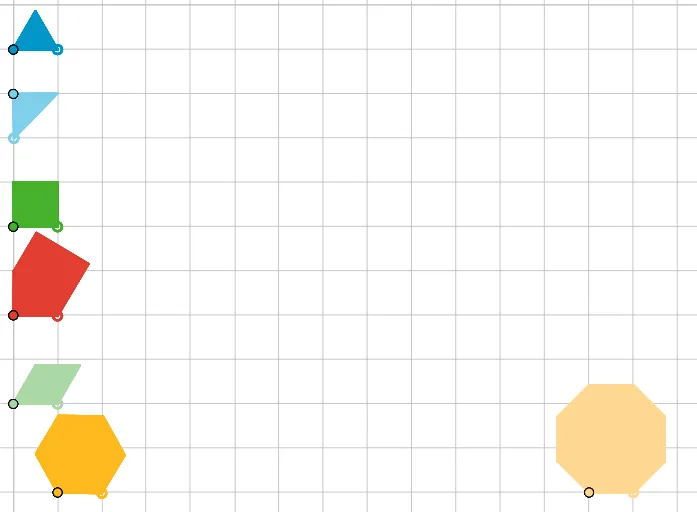
This example demonstrates how to generate tessellation patterns through rotation. Key mathematical concepts include rotational symmetry and geometric transformations. Using GeoGebra commands such as Point, Polygon, Rotate, LineBisector, etc., one can construct rotationally symmetric polygons. Suitable for middle school geometry lessons, it helps students understand rotational symmetry and the generation of tessellation patterns.
GeoGebra Commands & Parameters
Point(Circle[A, 1]) → BPolygon(A, B, 3) → poly1, f, g, h, CPoint(Circle[D, 1]) → ERotate(E, 90°, D) → E'Polygon(D, E, E') → t1, e', d, ePoint(Circle[M, 1]) → NRotate(N, 90°, M) → N'Rotate(M, 150°, N') → M'LineBisector(N, M') → iMidpoint(N, M') → FCircle(F, M') → cIntersect(c, i, 1) → GPolygon(M, N, G, M', N') → poly2, m, n, g_1, m', n'Point(Circle[H, 1]) → IPolygon(H, I, 4) → poly3, j, k, l, p, J, KPoint(Circle[L, 1]) → OPolygon(L, O, 8) → poly4, q, Q, R, S, T, U, r, s, t, a, b, f_1, h_1, PPoint(Circle[V, 1]) → WPolygon(V, W, 6) → poly5, i_1, C_1, j_1, k_1, l_1, m_1, n_1, Z, A_1, B_1Point(Circle[D_1, 1]) → E_1Rotate(E_1, 60°, D_1) → F_1Rotate(D_1, 120°, F_1) → G_1Polygon(D_1, E_1, G_1, F_1) → q1, d_1, e_1, p_1, q_1Point(Circle[A_2, 1]) → B_2Polygon(A_2, B_2, 3) → poly1_1, f_2, g_2, h_2, C_2Point(Circle[A_3, 1]) → B_3Polygon(A_3, B_3, 3) → poly1_2, f_3, g_3, h_3, C_3Point(Circle[A_4, 1]) → B_4Polygon(A_4, B_4, 3) → poly1_3, f_4, g_4, h_4, C_4Point(Circle[A_5, 1]) → B_5Polygon(A_5, B_5, 3) → poly1_4, f_5, g_5, h_5, C_5Point(Circle[A_6, 1]) → B_6Polygon(A_6, B_6, 3) → poly1_5, f_6, g_6, h_6, C_6Point(Circle[D_2, 1]) → E_2Rotate(E_2, 90°, D_2) → E'_1Polygon(D_2, E_2, E'_1) → t1_1, e'_1, d_2, e_2Point(Circle[D_3, 1]) → E_3Rotate(E_3, 90°, D_3) → E'_2Polygon(D_3, E_3, E'_2) → t1_2, e'_2, d_3, e_3Point(Circle[D_4, 1]) → E_4Rotate(E_4, 90°, D_4) → E'_3Polygon(D_4, E_4, E'_3) → t1_3, e'_3, d_4, e_4Point(Circle[D_5, 1]) → E_5Rotate(E_5, 90°, D_5) → E'_4Polygon(D_5, E_5, E'_4) → t1_4, e'_4, d_5, e_5Point(Circle[D_6, 1]) → E_6Rotate(E_6, 90°, D_6) → E'_5Polygon(D_6, E_6, E'_5) → t1_5, e'_5, d_6, e_6Point(Circle[H_1, 1]) → I_1Polygon(H_1, I_1, 4) → poly3_1, j_2, k_2, l_2, p_2, J_1, K_1Point(Circle[H_2, 1]) → I_2Polygon(H_2, I_2, 4) → poly3_2, j_3, k_3, l_3, p_3, J_2, K_2Point(Circle[H_3, 1]) → I_3Polygon(H_3, I_3, 4) → poly3_3, j_4, k_4, l_4, p_4, J_3, K_3Point(Circle[H_4, 1]) → I_4Polygon(H_4, I_4, 4) → poly3_4, j_5, k_5, l_5, p_5, J_4, K_4Point(Circle[H_5, 1]) → I_5Polygon(H_5, I_5, 4) → poly3_5, j_6, k_6, l_6, p_6, J_5, K_5Point(Circle[M_1, 1]) → N_1Rotate(N_1, 90°, M_1) → N'_1Rotate(M_1, 150°, N'_1) → M'_1LineBisector(N_1, M'_1) → i_2Midpoint(N_1, M'_1) → F_2Circle(F_2, M'_1) → c_1Intersect(c_1, i_2, 1) → G_2Polygon(M_1, N_1, G_2, M'_1, N'_1) → poly2_1, m_2, n_2, g_7, m'_1, n'_1Point(Circle[M_2, 1]) → N_2Rotate(N_2, 90°, M_2) → N'_2Rotate(M_2, 150°, N'_2) → M'_2LineBisector(N_2, M'_2) → i_3Midpoint(N_2, M'_2) → F_3Circle(F_3, M'_2) → c_2Intersect(c_2, i_3, 1) → G_3Polygon(M_2, N_2, G_3, M'_2, N'_2) → poly2_2, m_3, n_3, g_8, m'_2, n'_2Point(Circle[M_3, 1]) → N_3Rotate(N_3, 90°, M_3) → N'_3Rotate(M_3, 150°, N'_3) → M'_3LineBisector(N_3, M'_3) → i_4Midpoint(N_3, M'_3) → F_4Circle(F_4, M'_3) → c_3Intersect(c_3, i_4, 1) → G_4Polygon(M_3, N_3, G_4, M'_3, N'_3) → poly2_3, m_4, n_4, g_9, m'_3, n'_3Point(Circle[M_4, 1]) → N_4Rotate(N_4, 90°, M_4) → N'_4Rotate(M_4, 150°, N'_4) → M'_4LineBisector(N_4, M'_4) → i_5Midpoint(N_4, M'_4) → F_5Circle(F_5, M'_4) → c_4Intersect(c_4, i_5, 1) → G_5Polygon(M_4, N_4, G_5, M'_4, N'_4) → poly2_4, m_5, n_5, g_{10}, m'_4, n'_4Point(Circle[M_5, 1]) → N_5Rotate(N_5, 90°, M_5) → N'_5Rotate(M_5, 150°, N'_5) → M'_5LineBisector(N_5, M'_5) → i_6Midpoint(N_5, M'_5) → F_6Circle(F_6, M'_5) → c_5Intersect(c_5, i_6, 1) → G_6Polygon(M_5, N_5, G_6, M'_5, N'_5) → poly2_5, m_6, n_6, g_{11}, m'_5, n'_5Point(Circle[M_6, 1]) → N_6Rotate(N_6, 90°, M_6) → N'_6Rotate(M_6, 150°, N'_6) → M'_6LineBisector(N_6, M'_6) → i_7Midpoint(N_6, M'_6) → F_7Circle(F_7, M'_6) → c_6Intersect(c_6, i_7, 1) → G_7Polygon(M_6, N_6, G_7, M'_6, N'_6) → poly2_6, m_7, n_7, g_{12}, m'_6, n'_6Point(Circle[D_7, 1]) → E_7Rotate(E_7, 60°, D_7) → F_8Rotate(D_7, 120°, F_8) → G_8Polygon(D_7, E_7, G_8, F_8) → q1_1, d_7, e_7, p_7, q_2Point(Circle[D_8, 1]) → E_8Rotate(E_8, 60°, D_8) → F_9Rotate(D_8, 120°, F_9) → G_9Polygon(D_8, E_8, G_9, F_9) → q1_2, d_8, e_8, p_8, q_3Point(Circle[D_9, 1]) → E_9Rotate(E_9, 60°, D_9) → F_{10}Rotate(D_9, 120°, F_{10}) → G_{10}Polygon(D_9, E_9, G_{10}, F_{10}) → q1_3, d_9, e_9, p_9, q_4Point(Circle[D_{10}, 1]) → E_{10}Rotate(E_{10}, 60°, D_{10}) → F_{11}Rotate(D_{10}, 120°, F_{11}) → G_{11}Polygon(D_{10}, E_{10}, G_{11}, F_{11}) → q1_4, d_{10}, e_{10}, p_{10}, q_5Point(Circle[D_{11}, 1]) → E_{11}Rotate(E_{11}, 60°, D_{11}) → F_{12}Rotate(D_{11}, 120°, F_{12}) → G_{12}Polygon(D_{11}, E_{11}, G_{12}, F_{12}) → q1_5, d_{11}, e_{11}, p_{11}, q_6Point(Circle[V_1, 1]) → W_1Polygon(V_1, W_1, 6) → poly5_1, i_8, C_7, j_7, k_7, l_7, m_8, n_8, Z_1, A_7, B_7Point(Circle[V_2, 1]) → W_2Polygon(V_2, W_2, 6) → poly5_2, i_9, C_8, j_8, k_8, l_8, m_9, n_9, Z_2, A_8, B_8Point(Circle[V_3, 1]) → W_3Polygon(V_3, W_3, 6) → poly5_3, i_{10}, C_9, j_9, k_9, l_9, m_{10}, n_{10}, Z_3, A_9, B_9Point(Circle[V_4, 1]) → W_4Polygon(V_4, W_4, 6) → poly5_4, i_{11}, C_{10}, j_{10}, k_{10}, l_{10}, m_{11}, n_{11}, Z_4, A_{10}, B_{10}Point(Circle[V_5, 1]) → W_5Polygon(V_5, W_5, 6) → poly5_5, i_{12}, C_{11}, j_{11}, k_{11}, l_{11}, m_{12}, n_{12}, Z_5, A_{11}, B_{11}Point(Circle[L_1, 1]) → O_1Polygon(L_1, O_1, 8) → poly4_1, q_7, Q_1, R_1, S_1, T_1, U_1, r_1, s_1, t_1, a_1, b_1, f_7, h_7, P_1Point(Circle[L_2, 1]) → O_2Polygon(L_2, O_2, 8) → poly4_2, q_8, Q_2, R_2, S_2, T_2, U_2, r_2, s_2, t_2, a_2, b_2, f_8, h_8, P_2Point(Circle[L_3, 1]) → O_3Polygon(L_3, O_3, 8) → poly4_3, q_9, Q_3, R_3, S_3, T_3, U_3, r_3, s_3, t_3, a_3, b_3, f_9, h_9, P_3Point(Circle[L_4, 1]) → O_4Polygon(L_4, O_4, 8) → poly4_4, q_{10}, Q_4, R_4, S_4, T_4, U_4, r_4, s_4, t_4, a_4, b_4, f_{10}, h_{10}, P_4Point(Circle[L_5, 1]) → O_5Polygon(L_5, O_5, 8) → poly4_5, q_{11}, Q_5, R_5, S_5, T_5, U_5, r_5, s_5, t_5, a_5, b_5, f_{11}, h_{11}, P_5
AI Drawing Prompt Reference
Create a rotational symmetry pattern of polygons. Start by taking points A and D on a circle and drawing a triangle and a quadrilateral with A and D as vertices, respectively. Then rotate point E around D by 90 degrees to get E', and draw a triangle with D, E, and E'. Next, rotate point N around M by 90 degrees to get N', and draw a triangle with M, N, and N'. Continue by rotating point M around N' by 150 degrees to get M', and draw a triangle with M, N', and M'. Draw a circle with F as the center and M' as the radius, and draw a line i from the midpoint of N and M'. Then draw a triangle with M, N, and G as vertices. Next, take points H and L on a circle and draw a quadrilateral and an octagon with H and L as vertices, respectively. Then take point V on a circle and draw a hexagon with V as a vertex. Finally, rotate point E_1 around D_1 by 60 degrees to get F_1, and rotate F_1 by 120 degrees to get G_1, and draw a triangle with D_1, E_1, and G_1. Repeat this process around A_2, A_3, A_4, A_5, and A_6 to draw three triangles, and around D_2, D_3, D_4, D_5, and D_6 to draw three triangles.
The prompt above was compiled from the original drawing commands and is for reference only.