
Rotation 90 Degrees CW: Triangle and Pyramid Demo
Loading the math board and drawing, please wait…
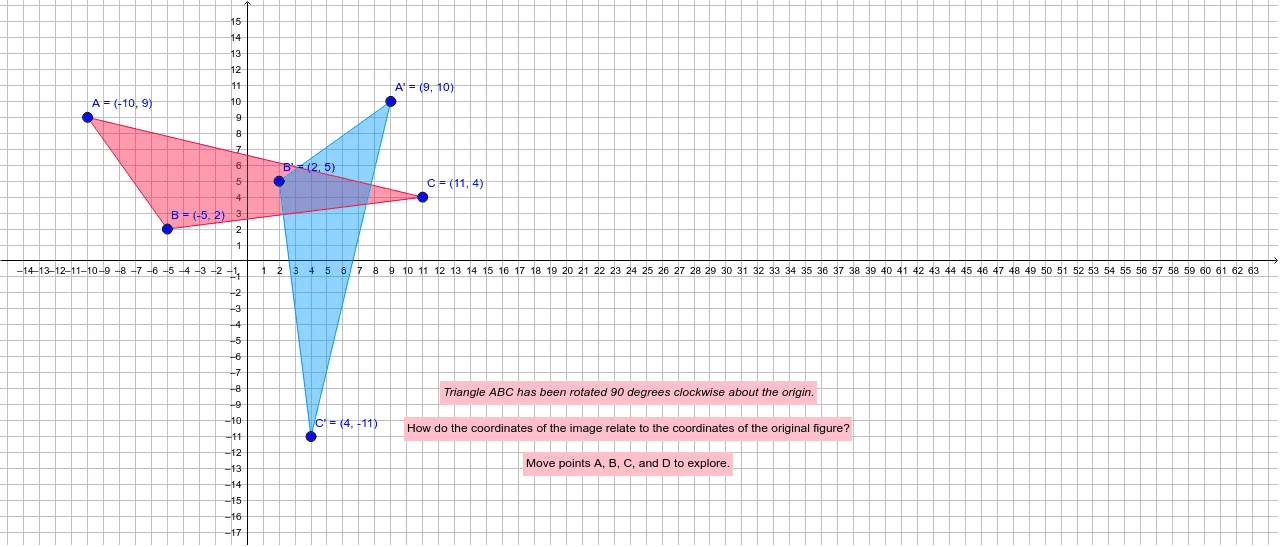
① This GeoGebra example demonstrates a triangle rotated 90 degrees clockwise around a point, showing both the original and rotated polygons and their corresponding sides to visualize the effect of a rotation transformation. ② The core mathematical concept is rotation in plane geometry, a type of similarity transformation, involving the center of rotation, angle of rotation, and correspondence of points; the tag 'Pyramid' may hint at a connection to 3D visualization or projection, but the main focus is 2D rotation. ③ Construction details: Points A, B, C are created with the Point command; the original triangle poly1 is built with Polygon; the Rotate command rotates the triangle and its sides (a, b, c) by 90 degrees around point D to produce the new triangle poly1' and sides a', b', c', along with rotated points A', B', C'; Intersect is used for intersection points, and text objects text1, text2, text3 label elements. ④ Suitable for middle or high school students learning geometric transformations, useful for classroom demonstrations of rotation properties, and as a template for teachers creating interactive rotation lessons.
GeoGebra Commands & Parameters
Point(xAxis) → GPoint(yAxis) → HIntersect(xAxis, yAxis) → IPolygon(A, C, B) → poly1, b, a, cIntersect(xAxis, yAxis) → DRotate(A, (-(90°)), D) → A'Rotate(C, (-(90°)), D) → C'Rotate(B, (-(90°)), D) → B'Polygon(A', C', B') → poly1', b', a', c'