
Translation Demonstration by Peter Mitchell
Loading the math board and drawing, please wait…
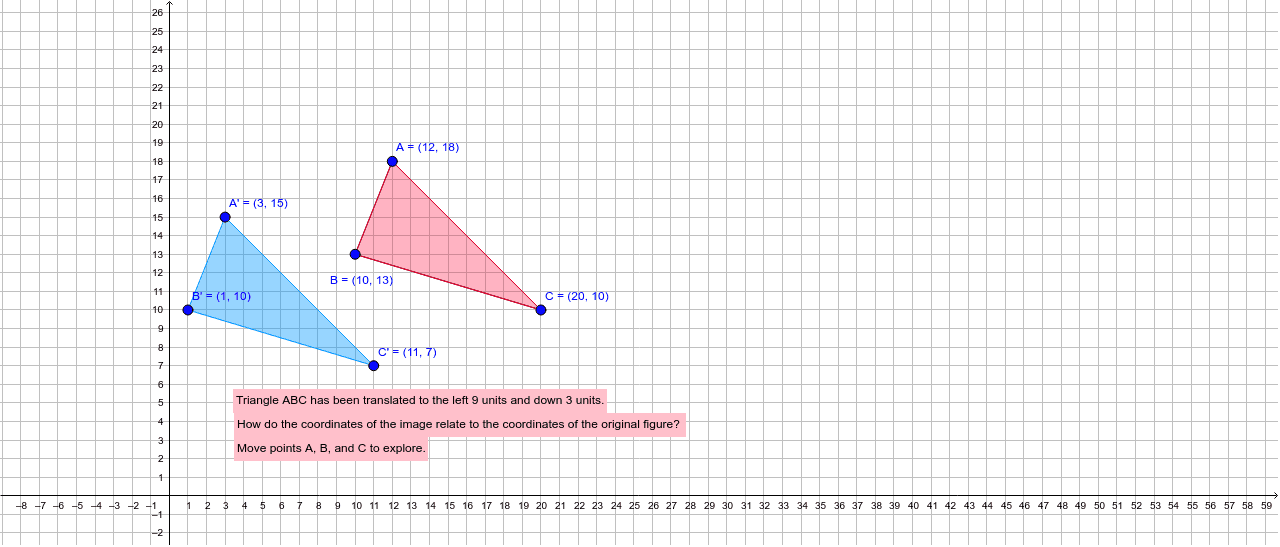
This example demonstrates the geometric effect and coordinate changes of a translation transformation. It involves core math concepts like vectors, line segments, polygons, coordinate geometry, and transformation. Construction highlights include commands/objects like Segment, Polygon, Vector, and Translate in GeoGebra. Suitable for high school students learning geometric transformations and coordinate representations.
GeoGebra Commands & Parameters
Segment(A, B) → aSegment(C, B) → bSegment(A, C) → cPolygon(A, B, C) → poly1, c_1, a_1, b_1Vector(D, E) → uVector(F, G) → vTranslate(A, v) → A'Translate(B, v) → B'Translate(C, v) → C'Polygon(A', B', C') → poly1', c', a', b'
AI Drawing Prompt Reference
Draw a triangle ABC, then draw vector u from point D to point E, and draw vector v from point F to point G. Translate each point of triangle ABC along vector v to get a new triangle A'B'C'. Observe the changes in the figure before and after the translation.
The prompt above was compiled from the original drawing commands and is for reference only.