
Rotating Square
Loading the math board and drawing, please wait…
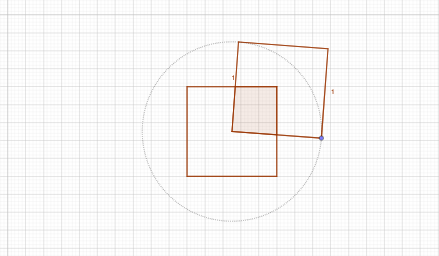
This example demonstrates the dynamic process of a square rotating around the center of another square. It involves core mathematical concepts such as geometric transformations, rotational symmetry, and coordinate geometry. The construction utilizes commands like Polygon, Segment, Intersect, Circle, and Point in GeoGebra. Suitable for high school students learning geometric transformations and coordinate geometry.
GeoGebra Commands & Parameters
Polygon(A, B, 4) → poly1, f, g, h, i, C, DSegment(D, B) → jSegment(A, C) → kIntersect(j, k) → ECircle(E, 1) → cPoint(c) → FPolygon(E, F, 4) → poly2, l, m, n, p, G, HIntersect(h, p) → IIntersect(g, l) → JIntersect(h, l) → KIntersect(i, p) → LIntersect(i, l) → MIntersect(f, p) → NIntersect(f, l) → OIntersect(g, p) → PPolygon(O, E, P, B) → q1, o, e, p_1, bPolygon(E, J, R, I) → q2, e_1, j_1, r, i_1Polygon(L, Q, K, E) → q3, l_1, q, k_1, e_2Polygon(E, M, A, N) → q4, e_3, m_1, a, n_1
AI Drawing Prompt Reference
Draw a square rotating around the center of another square to demonstrate dynamic geometric transformation. Start by sketching two squares, then find the midpoint of the sides of one square relative to the rotation center and draw a circle. Mark a point on the circle and use it to form a second square. Connect the intersections of the sides of both squares to create multiple smaller polygons, highlighting the rotational effect and symmetry.
The prompt above was compiled from the original drawing commands and is for reference only.