
Rotating Polygons
Loading the math board and drawing, please wait…
In collections
学习 GeoGebra 经典应用
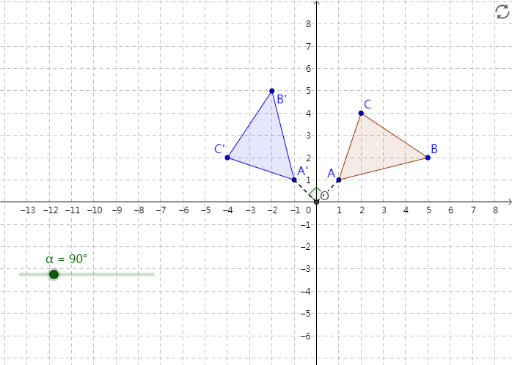
This example demonstrates how to rotate polygons. The core math concepts involved include geometric rotation and plane geometry. The construction points include using GeoGebra commands Polygon, Intersect, Rotate, Segment, and Angle. Suitable for middle school or high school students learning plane geometry and geometric rotation concepts.
GeoGebra Commands & Parameters
Polygon(A, B, C) → poly1, c, a, bIntersect(xAxis, yAxis) → ORotate(A, α, O) → A'Rotate(B, α, O) → B'Rotate(C, α, O) → C'Polygon(A', B', C') → poly1', c', a', b'Segment(A, O) → dSegment(O, A') → eAngle(A, O, A') → β
AI Drawing Prompt Reference
On a coordinate plane, first draw a triangle using points A, B, and C as vertices. Take the origin O as the rotation center, then rotate points A, B, and C around O by the same angle α to obtain the corresponding points A', B', and C'. Draw a second triangle connecting A', B', and C'. Finally, draw segment A–O and segment O–A', and mark the angle β formed by the points A, O, and A' to show the rotation-related angle.
The prompt above was compiled from the original drawing commands and is for reference only.