
Rotating Cuboid with Midpoint Triangle
Loading the math board and drawing, please wait…
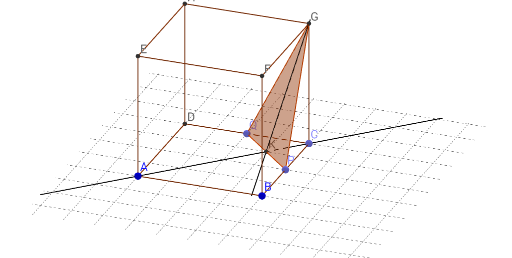
① This example demonstrates a cuboid rotating in 3D space with a triangle formed by midpoints of its edges or faces, showing dynamic transformations and geometric relationships. ② Core math concepts include solid geometry (cuboid properties), midpoint theorem, triangle construction, rotation transformations, Pythagorean theorem for distance calculations, and complex numbers possibly used for rotation representation. ③ Construction details: GeoGebra commands such as Segment, Point, Cube, Polygon, OrthogonalLine, Intersect, Distance, and Midpoint are used to build the cuboid faces (faceABCD, etc.) and edges (edgeAD, etc.), then midpoints M, points P, Q, and polygon poly1 create the midpoint triangle, with auxiliary line l and point n facilitating rotation. ④ Suitable for high school or early college students learning solid geometry, spatial reasoning, and dynamic geometry construction, as well as for teachers demonstrating rotating solids and cross-sections.
GeoGebra Commands & Parameters
Segment(K_1, J) → pSegment(I, J) → qSegment(I, K_1) → rPoint(Circle[B, Distance[A, B], Segment[A, B]]) → CCube(A, B, C) → a, D, faceCDHG, faceEFGH, edgeAD, edgeAB, edgeBC, edgeCD, edgeAE, edgeDH, edgeEH, edgeEF, E, edgeBF, edgeFG, edgeCG, edgeGH, F, G, H, faceABCD, faceADHE, faceABFE, faceBCGFPoint(edgeBC) → PPoint(edgeCD) → QPolygon(G, P, Q) → poly1, n, g, l_1OrthogonalLine(G, g, space) → fOrthogonalLine(A, g, space) → hIntersect(h, g) → KDistance(P, C) → distancePCMidpoint(P, C) →
AI Drawing Prompt Reference
Draw a cube, then take the midpoints P and Q on edges BC and CD respectively, and connect PQ to form a triangle. Next, rotate this triangle around one of the cube's faces to show the cube's rotation and the dynamic changes of the triangle.
The prompt above was compiled from the original drawing commands and is for reference only.