
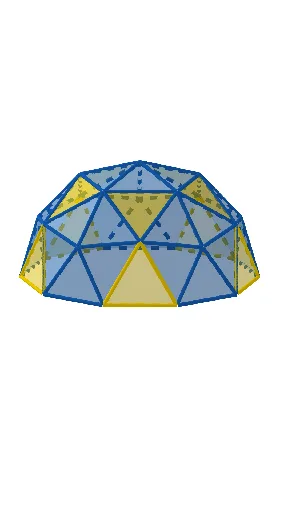
Geodesic Dome: Triangular Subdivision of a Sphere from an Icosahedron
Loading the math board and drawing, please wait…
This GeoGebra example demonstrates how to construct a geodesic dome by subdividing the faces of a regular icosahedron and projecting points onto a sphere. It visualizes a spherical triangular mesh derived from the icosahedron's edges and faces. Core mathematical concepts include the geometry of regular polyhedra, spherical triangulation, equilateral triangle grids, rotations and geometric transformations, as well as 3D distance and sphere intersection. The construction uses GeoGebra commands such as Icosahedron, Midpoint, Ray, Distance, Sphere, Intersect, Polygon, Line, and Sequence. Key objects include vertices O, A, B, C, etc., and triangular faces like caraABC, caraACF, and edges like aristaAC. This resource is suitable for high school or university courses in solid geometry, computer graphics, or mathematical modeling, helping learners understand the transition from polyhedral to spherical structures and the role of geometric transformations in 3D design.
GeoGebra Commands & Parameters
Icosahedron(A, B, C) → a, D, caraABC, caraACF, caraAFG, caraADG, caraABD, caraBDH, caraBEH, caraBCE, caraCEI, caraCFI, E, caraEHK, caraEIK, caraIKL, caraFIL, caraHJK, caraJKL, caraGJL, caraFGL, caraDHJ, caraDGJ, F, aristaAC, aristaAB, aristaBC, aristaAF, aristaCF, aristaAG, aristaFG, aristaAD, aristaDG, aristaBD, G, aristaBH, aristaDH, aristaBE, aristaEH, aristaCE, aristaCI, aristaEI, aristaFI, aristaEK, aristaHK, H, aristaIK, aristaIL, aristaKL, aristaFL, aristaJK, aristaHJ, aristaJL, aristaGL, aristaGJ, aristaDJ, I, J, K, LMidpoint(F, C) → MMidpoint(I, F) → NMidpoint(I, C) → PRay(O, M) → fRay(O, N) → gRay(O, P) → hDistance(O, A) → rSphere(O, A) → bIntersect(f, b) → Q,Intersect(g, b) → R,Intersect(h, b) → S,Polygon(F, R, Q) → t1, q, f_1, r_1Polygon(Q, S, C) → t2, c, q_1, sPolygon(R, I, S) → t3, s_1, r_2, iLine(O, F) → ejePolygon(R, Q, S) → t4, s_2, r_3, q_2Sequence(Rotate[t4, (i * α), eje], i, 0, 4) → l2Sequence(Rotate[l1, (i * α), eje], i, 0, 4) → l3Midpoint(I, E) → TMidpoint(C, E) → UMidpoint(C, B) → VRay(O, T) → jRay(O, U) → kRay(O, V) → lIntersect(j, b) → W,Intersect(k, b) → Z,Intersect(l, b) → A_1,Polygon(I, W, S) → t5, s_3, i_1, wPolygon(S, Z, C) → t7, c_1, s_4, z_2Midpoint(E, B) → B_1Ray(O, B_1) → mIntersect(m, b) → C_1,Polygon(S, W, Z) → t6, z_1, s_6, w_1Polygon(C, Z, A_1) → t9, a_1, c_2, z_4Sequence(Rotate[l4, (i * α), eje], i, 0, 4) → l5Sequence(Rotate[t6, (i * α), eje], i, 0, 4) → l6
AI Drawing Prompt Reference
Draw a spherical triangular mesh derived from subdividing the faces of a regular icosahedron, showing the construction process. Start by creating an icosahedron, then find midpoints of its edges to form new triangles, project these triangle vertices onto a sphere, and finally create the spherical mesh. Highlight how rotations and translations are applied to the mesh, and the intersection points between the sphere and triangles.
The prompt above was compiled from the original drawing commands and is for reference only.