
Rotating Cuboid by Gabriele Sponheimer (2)
Loading the math board and drawing, please wait…
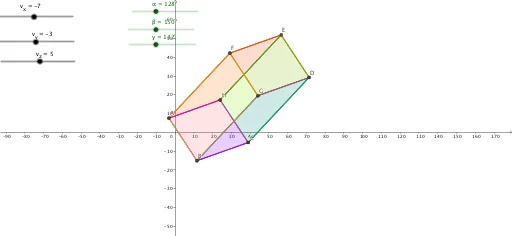
This example demonstrates the process and 3D shape of a cuboid rotating around an axis to form a rotational solid. Core math concepts include solid geometry, rotation motion, curve sketching, derivative application, and geometric transformations. Construction highlights from the summary involve commands like Segment and Polygon to build the cuboid vertices (v_x, B1, A1) and apply rotations (γ, β, α) with transformations (T_z, T_y, T_x). Suitable for high school and above, aiding in understanding rotational solids, spatial geometry, and calculus applications.
GeoGebra Commands & Parameters
Segment(A, B) → fSegment(B, C) → gSegment(C, D) → hSegment(D, E) → iSegment(E, F) → jSegment(G, D) → kSegment(G, B) → aSegment(A, F) → f_1Segment(A, H) → g_1Segment(H, E) → h_1Segment(F, G) → i_1Segment(C, H) → j_1Polygon(A, H, E, F) → q1, a_1, h_2, e_1, f_2Polygon(B, C, D, G) → q2, b_1, c_1, d_1, g_2Polygon(H, C, D, E) → q3, h_3, c_2, d_2, e_2Polygon(A, H, C, B) → q4, a_2, h_4, c_3, b_2Polygon(A, B, G, F) → q5, a_3, b_3, g_3, f_3Polygon(E, F, G, D) → q6, e_3, f_4, g_4, d_3
AI Drawing Prompt Reference
Draw a rotational solid showing the process of a cuboid rotating around an axis. Start by sketching the six edges of the cuboid, then construct its vertices. Apply three rotations (around x, y, z axes) to generate the rotation path. Finally, fill the surface and path with polygons to form a 3D rotational solid, highlighting spatial geometry and calculus applications.
The prompt above was compiled from the original drawing commands and is for reference only.