
Rotate Design to Finish Last Side
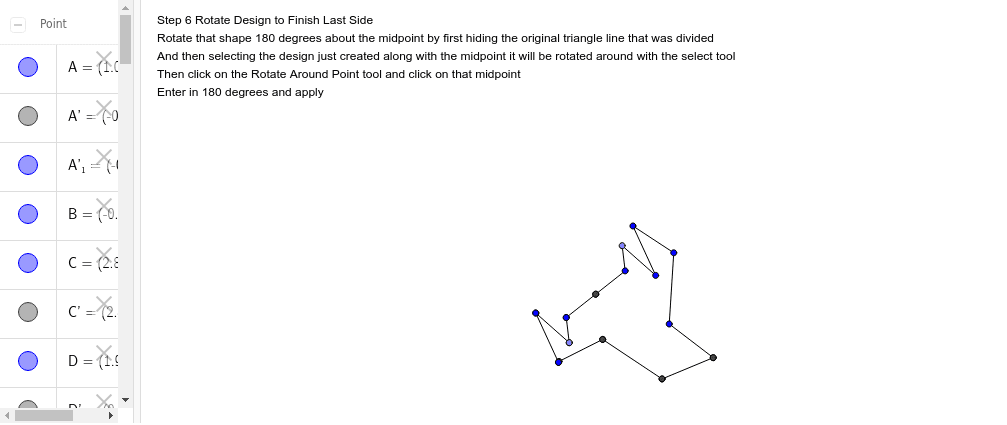
Loading the math board and drawing, please wait…
In collections
Not Real, Practice Triangle Rotation Tessellation Math 206
This example demonstrates completing the last side of a geometric design by rotating the shape. It involves core mathematical concepts such as rotation, midpoint, line segments, and trigonometric functions. The construction uses GeoGebra commands and objects like Segment, Rotate, Midpoint, and Point, as summarized. Suitable for high school mathematics teaching, illustrating geometric transformations and parametric design.
GeoGebra Commands & Parameters
Segment(A, B) → aSegment(B, C) → bSegment(C, A) → cSegment(A, D) → dSegment(D, E) → eSegment(E, C) → fRotate(A, 60*°, C) → A'Rotate(D, 60*°, C) → D'Segment(A', D') → d'Rotate(D, 60*°, C) → D'_1Rotate(E, 60*°, C) → E'Segment(D'_1, E') → e'Rotate(E, 60*°, C) → E'_1Rotate(C, 60*°, C) → C'Segment(E'_1, C') → f'Midpoint(a) → FSegment(F, G) → gPoint(a) → HSegment(H, I) → hSegment(A, I) → iSegment(H, G) → jRotate(F, 180*°, F) → F'Rotate(G, 180*°, F) → G'Segment(F', G') → g'Rotate(H, 180*°, F) → H'Rotate(I, 180*°, F) → I'Segment(H', I') → h'Rotate(A, 180*°, F) → A'_1Rotate(I, 180*°, F) → I'_1Segment(A'_1, I'_1) → i'Rotate(H, 180*°, F) → H'_1Rotate(G, 180*°, F) → G'_1Segment(H'_1, G'_1) → j'
AI Drawing Prompt Reference
Draw a hexagon formed by connecting the vertices of a triangle to points on the opposite sides. Rotate two vertices of the hexagon around the triangle's center by 60 degrees and connect the rotated points. Complete the design by creating a symmetrical pattern by rotating half of the hexagon around its center by 180 degrees.
The prompt above was compiled from the original drawing commands and is for reference only.