
Rotate by Any Angle About Origin
Loading the math board and drawing, please wait…
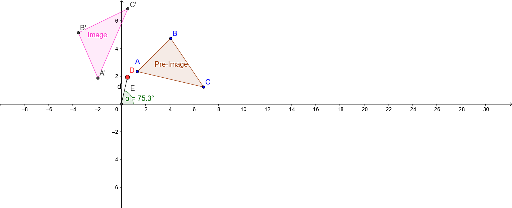
This example demonstrates how to rotate any figure by any angle about the origin using GeoGebra. Key math concepts involved include rotation, angles, and geometric transformations. Construction highlights involve using GeoGebra commands and objects like Intersect, Circle, Polygon, Point, Segment, Angle, Rotate, and Distance. Suitable for high school mathematics students and teachers to understand and practice geometric transformations.
GeoGebra Commands & Parameters
Intersect(xAxis, yAxis) → ECircle(E, 2) → gPolygon(A, B, C) → poly1, c, a, bPoint(g) → DSegment(D, E) → dPoint(xAxis) → FAngle(F, E, D) → αRotate(A, α, E) → A'Rotate(B, α, E) → B'Rotate(C, α, E) → C'Polygon(A', B', C') → poly1', c', a', b'Distance(E, A) → eDistance(E, A) → f
AI Drawing Prompt Reference
Draw a coordinate system, create a circle centered at the origin with radius 2, and draw a triangle. Mark the intersection of the circle with the x-axis, connect this point to the origin, and place a point on the x-axis from the intersection. Measure the angle between this point, the origin, and another point on the circle. Rotate the triangle's three vertices around the origin by this angle, draw the rotated triangle, and show the distance between the original and rotated triangles.
The prompt above was compiled from the original drawing commands and is for reference only.