
Root Rectangles 4-8
Loading the math board and drawing, please wait…
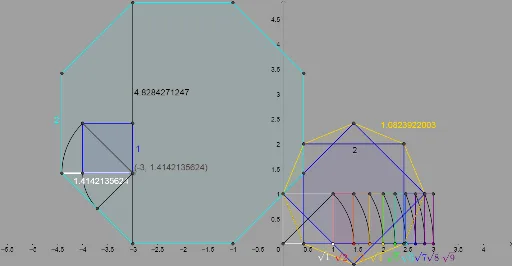
This example demonstrates the geometric construction and properties of root rectangles 4-8. It involves core math concepts like rectangles, square roots, symmetry, line segment operations, and percentage calculations. Key GeoGebra commands used include Point, Segment, Polygon, Line, Circle, Intersect, OrthogonalLine, CircleArc, Rotate, and Angle for constructing and transforming geometric figures. Suitable for high school mathematics education, illustrating the integration of geometric transformations and algebraic computations.
GeoGebra Commands & Parameters
Point(xAxis) → APoint(xAxis) → BPoint(xAxis) → DPoint(yAxis) → ESegment(O, P) → nPoint(xAxis) → CPoint(xAxis) → GPolygon(C, G, 4) → poly1, f, g, h, i, H, ISegment(C, H) → jLine(C, G) → kCircle(C, H) → cIntersect(c, k, 2) → JOrthogonalLine(J, k) → lLine(H, k) → mIntersect(l, m) → A_1Polygon(G, H, A_1, J) → q1, g_1, h_1, a_1, j_1Circle(C, A_1) → dIntersect(d, k, 2) → B_1Line(B_1, l) → pIntersect(m, p) → C_1Polygon(J, B_1, C_1, A_1) → q2, j_2, b_1, c_1, qCircle(C, C_1) → eIntersect(e, k, 2) → D_1Line(D_1, p) → rIntersect(m, r) → E_1Polygon(B_1, D_1, E_1, C_1) → q3, s, d_1, e_1, tCircle(C, E_1) → f_1Intersect(f_1, k, 2) → F_1Line(F_1, r) → aIntersect(m, a) → G_1Polygon(D_1, F_1, G_1, E_1) → q4, b, i_1, k_1, l_1Circle(C, G_1) → p_1Intersect(p_1, k, 2) → H_1Line(H_1, a) → m_1Intersect(m, m_1) → I_1Polygon(F_1, H_1, I_1, G_1) → q5, n_1, q_1, r_1, s_1Circle(C, I_1) → t_1Intersect(t_1, k, 2) → J_1Line(J_1, m_1) → f_2Intersect(m, f_2) → K_1Polygon(H_1, J_1, K_1, I_1) → q6, g_2, h_2, i_2, k_2Circle(C, K_1) → c_2Intersect(c_2, k, 2) → L_1Line(L_1, f_2) → l_2Intersect(m, l_2) → M_1Polygon(J_1, L_1, M_1, K_1) → q7, m_2, n_2, p_2, q_2Circle(C, M_1) → d_2Intersect(d_2, k, 2) → N_1Line(N_1, l_2) → r_2Intersect(m, r_2) → O_1Polygon(L_1, N_1, O_1, M_1) → q8, s_2, t_2, o_1, a_2CircleArc(C, J, H) → e_2CircleArc(C, B_1, A_1) → c_3CircleArc(C, D_1, C_1) → d_3CircleArc(C, F_1, E_1) → e_3CircleArc(C, J_1, I_1) → f_3CircleArc(C, H_1, G_1) → g_3CircleArc(C, L_1, K_1) → h_3CircleArc(C, N_1, M_1) → k_3Polygon(C, G, 8) → poly2, b_2, Q_1, R_1, S_1, T_1, U_1, i_3, j_3, l_3, m_3, n_3, p_3, q_3, P_1Rotate(H, (-(135°)), I) → H'Angle(H', I, H) → βRotate(H, 135°, I) → H'_1Angle(H, I, H'_1) → γRotate(H, (-(67.5°)), I) → H'_2Angle(H'_2, I, H) → αLine(I, H'_2) → r_3Intersect(r_3, f) → V_1Rotate(I_1, 67.5°, M_1) → Z_1Angle(I_1, M_1, Z_1) → εLine(M_1, Z_1) → s_3Intersect(s_3, n_1) → A_2Segment(V_1, I) → t_3Segment(A_2, M_1) → a_3Polygon(I, V_1, 8) → poly3, b_3, C_2, D_2, E_2, F_2, G_2, f_4, g_4, h_4, i_4, j_4, k_4, l_4, B_2Segment(G_2, E_2) → m_4Polygon(E_2, G_2, 4) → poly4, n_4, p_4, q_4, r_4, W_1, H_2Segment(I, F_2) → s_4Polygon(F_2, I, 4) → poly5, t_4, a_4, b_4, c_4, I_2, J_2Point(xAxis) → K_2Point(xAxis) → L_2Polygon(K_2, L_2, 8) → poly6, d_4, N_2, O_2, P_2, Q_2, R_2, e_4, f_5, g_5, h_5, i_5, j_5, k_5, M_2Segment(P_2, K_2) → l_5Segment(R_2, M_2) → m_5Intersect(l_5, m_5) → S_2Segment(S_2, R_2) → n_5Point(xAxis) → T_2Line(T_2, K_2) → p_5OrthogonalLine(T_2, p_5) → q_5Intersect(q_5, n_5) → U_2Polygon(U_2, S_2, 4) → poly7, r_5, s_5, t_5, a_5, V_2, W_2Segment(S_2, W_2) → b_5CircleArc(S_2, W_2, R_2) → c_5Rotate(U_2, 45°, S_2) → Z_2CircleArc(S_2, U_2, Z_2) → d_5Segment(Z_2, S_2) → e_5
AI Drawing Prompt Reference
Draw a geometric pattern consisting of four interlocking rectangles, each constructed using square roots, symmetry, line segment operations, and percentage calculations. Start by placing four points on the x-axis and connect them to form rectangles. Then, use rotations, circles, and orthogonal lines to create intricate shapes within each rectangle, resulting in a complex and symmetrical design.
The prompt above was compiled from the original drawing commands and is for reference only.