
Rings on Sphere
Loading the math board and drawing, please wait…
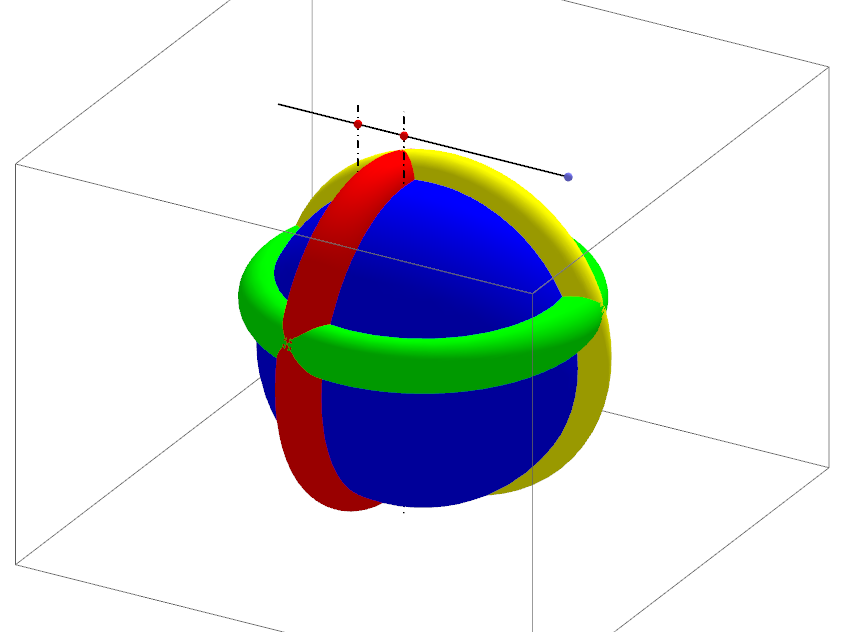
This example demonstrates the construction of rings on a sphere, showcasing mixed surfaces in geometry. It involves core math concepts like solid geometry, coordinate geometry, parametric equations, and intersection operations. Key GeoGebra commands and objects used in the construction include Intersect, Point, Segment, OrthogonalLine, Sphere, and Surface. Suitable for high school and above, it helps students learn spatial geometric constructions, 3D shape drawing, and parametric representations, aiding in understanding the formation of complex geometric shapes.
GeoGebra Commands & Parameters
Intersect(yAxis, xAxis) → APoint(Ray[(0, -1, 6), (0, -2, 6)]) → RSegment(R, R') → dPoint(d) → CPoint(d) → DOrthogonalLine(C, xOyPlane) → dcOrthogonalLine(D, xOyPlane) → ddSphere(A, (-y(R))) → sphIntersect(dc, sph) → E', EIntersect(dd, sph) → F', FSurface(((a + (b * cos(v))) * cos(u)), (b * sin(v)) + c, ((a + (b * cos(v))) * sin(u)), u, 0, 6.28319, v, 0, 6.28319) → surfSurface(((a + (b * cos(v))) * cos(u)), ((a + (b * cos(v))) * sin(u)), (b * sin(v)) + c, u, 0, 6.28319, v, 0, 6.28319) → gSurface((b * sin(v)) + c, ((a + (b * cos(v))) * cos(u)), ((a + (b * cos(v))) * sin(u)), u, 0, 6.28319, v, 0, 6.28319) → h