
Right Triangles and Geometric Mean Demo
Loading the math board and drawing, please wait…
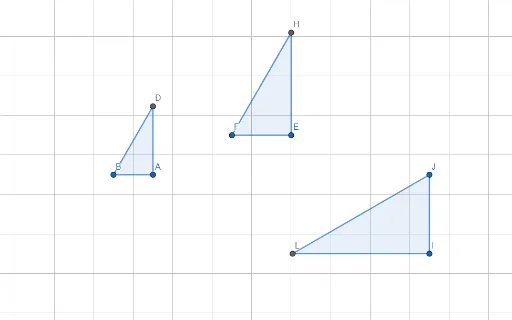
This example demonstrates the geometric mean theorem and reflection properties in right triangles. It involves core concepts like right triangles, geometric mean, reflection, and solid geometry. Construction highlights include using commands such as Rotate, Angle, Line, Intersect, and Polygon in GeoGebra. Suitable for high school mathematics education to understand geometric transformations and relationships in 3D shapes.
GeoGebra Commands & Parameters
Rotate(A, 60°, B) → A'Angle(A, B, A') → αLine(B, A') → fLine(A, C) → gIntersect(f, g) → DPolygon(B, A, D) → t1, d, b, aRotate(E, 60°, F) → E'Angle(E, F, E') → βLine(F, E') → hLine(E, G) → iIntersect(h, i) → HPolygon(F, E, H) → t2, h_1, f_1, eRotate(I, (-(60°)), J) → I'Angle(I', J, I) → γLine(I', J) → jLine(I, K) → kIntersect(j, k) → LPolygon(L, I, J) → t3, j_1, l, i_1
AI Drawing Prompt Reference
Draw a right triangle ABC with AB as the right angle side and BC as the hypotenuse. Rotate point A 60 degrees around point B to get A', and draw line f through B and A'. Draw line g through A and C, and let them intersect at D to form triangle BAD. Next, draw a right triangle EFG with EF as the right angle side and FG as the hypotenuse. Rotate point E 60 degrees around point F to get E', and draw line h through F and E'. Draw line i through E and G, and let them intersect at H to form triangle FEH. Finally, draw a right triangle IJK with IJ as the right angle side and JK as the hypotenuse. Rotate point I -60 degrees around point J to get I', and draw line j through I' and J. Draw line k through I and K, and let them intersect at L to form triangle IJK.
The prompt above was compiled from the original drawing commands and is for reference only.