
SAS Congruence Demonstration by Bernard Smith
Loading the math board and drawing, please wait…
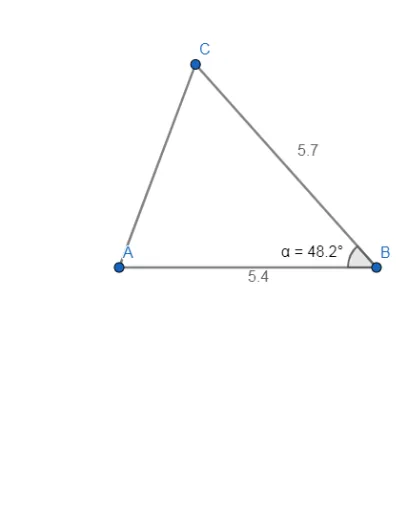
This example dynamically demonstrates the SAS (Side-Angle-Side) condition for triangle congruence using GeoGebra. It involves core mathematical concepts such as triangle congruence criteria, relationships between angles and sides, and geometric constructions. The construction uses commands like Point, Segment, and Angle to create points, line segments, and measure angles. It is suitable for middle school students and above to learn geometric proofs and spatial reasoning, as well as for high school math competition preparation as a teaching aid.
GeoGebra Commands & Parameters
Point(Circle[A, 5.4]) → BSegment(A, B) → fPoint(Circle[B, 5.7]) → CSegment(B, C) → gAngle(A, B, C) → αPoint(Circle[D, 5.4]) → ESegment(D, E) → hPoint(Circle[E, 5.7]) → FSegment(E, F) → iAngle(D, E, F) → βSegment(A, C) → jSegment(D, F) → k
AI Drawing Prompt Reference
Draw two triangles to demonstrate the side-angle-side congruence condition. First, construct a triangle by placing a point on a circle with radius 5.4 centered at a starting point, then connect these two points to form one side. Next, place another point on a circle with radius 5.7 centered at the second point, and connect the second and third points to form the second side, marking the angle between these two sides. Then, construct a second triangle similarly: draw a side of length 5.4, then a side of length 5.7, ensuring the included angle matches the first triangle's angle. Finally, connect the remaining vertices to complete both triangles.
The prompt above was compiled from the original drawing commands and is for reference only.