
Right Triangle to Isosceles Triangle
Loading the math board and drawing, please wait…
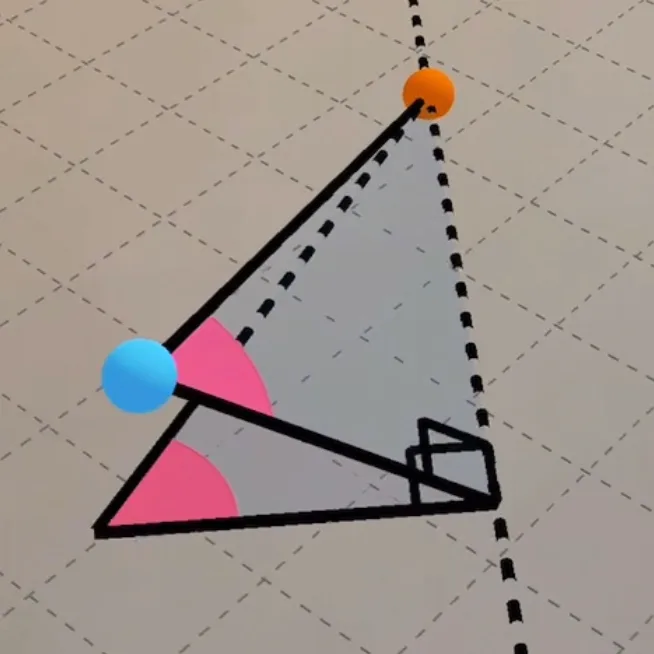
This example demonstrates how to transform a right triangle into an isosceles triangle by adjusting its side lengths. Key mathematical concepts include the properties of triangles, definitions of right and isosceles triangles. Using GeoGebra commands such as PointIn, Line, Intersect, etc., the dynamic transformation process is illustrated. Suitable for middle and high school students to learn about geometric transformations and triangle properties.
GeoGebra Commands & Parameters
PointIn(Plane[(0, 0, 0), (1, 1, 0), (1, 0, 0)]) → APointIn(Plane[(0, 0, 0), (1, 1, 0), (1, 0, 0)]) → BLine(A, B) → fPoint(f) → CPointIn(Plane[(0, 0, 0), (1, 1, 0), (1, 0, 0)]) → DOrthogonalLine(D, f, space) → gIntersect(g, f) → EAngle(C, E, D) → αPolygon(D, C, E) → t1, e, d, cCircle(D, (0.35 * Distance[D, E]), zAxis) → hIntersect(c, h) → F, GAngle(E, D, C) → βIntersect(e, h) → H,CircleSector(D, G, H) → kMirror(D, E) → D'Semicircle(D, D', xOyPlane) → pRotate(p, (-(pi / 2)), g) → p'Point(p') → IPolygon(I, E, C) → t2, c_1, i, e_1Sphere(I, (0.35 * Distance[D, E])) → aIntersect(c_1, a) → J,Intersect(e_1, a) → K,CircleSector(I, J, K) → qAngle(I, E, C) → γ
AI Drawing Prompt Reference
Draw a right triangle and transform it into an isosceles triangle by adjusting side lengths to illustrate the dynamic transformation process. Start by drawing two legs of the right triangle, then take a point on one leg and connect it to the right angle vertex to form the hypotenuse. Next, draw a circle centered at the midpoint of the hypotenuse, intersecting it at two points, and connect these points to the right angle vertex to form the isosceles triangle. Finally, draw a sector centered at the vertex of the isosceles triangle and mirror the triangle to complete the figure.
The prompt above was compiled from the original drawing commands and is for reference only.