
Right Circular Cylinder - Surface Area and Volume
Loading the math board and drawing, please wait…
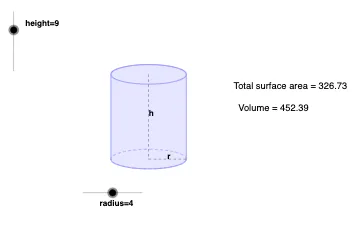
This example demonstrates the geometric construction of a right circular cylinder and the calculation of its surface area and volume. Key mathematical concepts include the geometric properties of a cylinder, formulas for surface area and volume. Using GeoGebra commands such as Dilate, Vector, and Translate, the construction process is dynamically shown. Suitable for middle school and above students or teachers to understand basic concepts of solid geometry.
GeoGebra Commands & Parameters
Dilate(B, height, A) → CVector(A, C) → uTranslate(c, u) → dTranslate(R, u) → DTranslate(P, u) → ETranslate(L, u) → FArc(c, 3.141592653589793, 0) → fPolygon(F, D, R, L) → Q, f_1, d_1, r_1, lSegment(E, P) → aSegment(P, R) → bMidpoint(E, P) → GMidpoint(P, R) → HArc(d, 0, π) → e
AI Drawing Prompt Reference
Draw a right circular cylinder to demonstrate surface area and volume calculations. Start with a base circle, then extrude it vertically to form the cylindrical side. Combine arcs and lines to represent the top and bottom circles. Label key points like centers and midpoints, and draw connecting segments. Finally, use arcs and lines to enclose the side, showing the dynamic construction process.
The prompt above was compiled from the original drawing commands and is for reference only.