
Dividing a Segment in a Given Ratio with Dynamic Construction
Loading the math board and drawing, please wait…
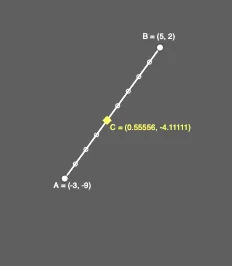
This example demonstrates how to divide a line segment into internal division points according to a specified ratio, and how to repeat the process for different sets of points and ratio parameters. The key mathematical ideas are segment ratio division (weighted division on a line), the mean/average interpretation of special ratios, and the use of sequences to systematically generate multiple division points and visualize the pattern. Construction is built in GeoGebra using Segment to define the main segment and its endpoints/related points, Dilate to realize the proportional relationship geometrically, and Sequence to produce a list/chain of division points for varying parameters (reflected by objects such as x_1, x_2, y_1, y_2, A, B, and parameters like a, m, n, C, b, c along with text and lists for display). Suitable for middle/high-school geometry instruction and for classroom demonstrations or exploratory learning on geometric constructions and transformations.
GeoGebra Commands & Parameters
Segment(B, A) → aDilate(B, m / (m + n), A) → CSegment(B, C) → bSegment(C, A) → cSequence(Dilate[C, i / n, B], i, 1, n) → list2Sequence(Dilate[C, i / m, A], i, 1, m) → list1
AI Drawing Prompt Reference
Draw a line segment and divide it into several points according to a given ratio. Use a line segment as the base and apply geometric transformations to find the division points. Then, draw these points in sequence to form a pattern. Ensure that the division points are evenly distributed and maintain the proportional relationship of the line segment.
The prompt above was compiled from the original drawing commands and is for reference only.