
Right Circular Cone: Dynamic Construction and Geometric Demonstration
Loading the math board and drawing, please wait…
In collections
Area, Surface Area, Volume--Nets
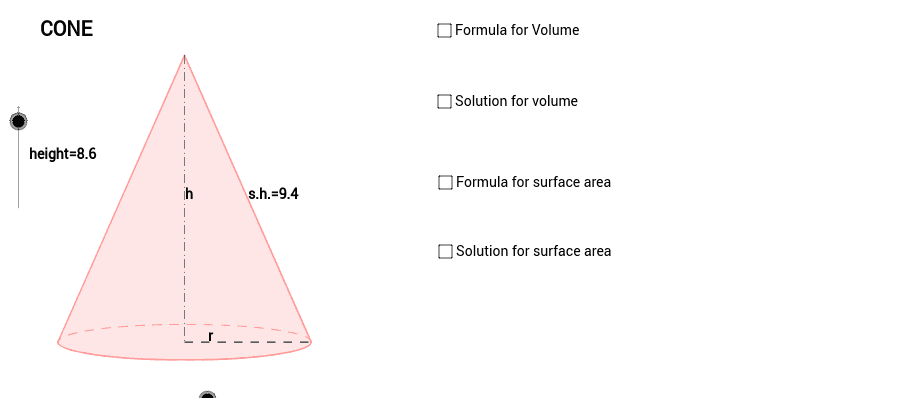
This GeoGebra example demonstrates the construction of a right circular cone, visualizing its base circle, apex, slant height, and the relationships between height, radius, and generating lines. The core mathematical concepts include the definition of a cone as a solid of revolution, properties of circles, axial cross-sections forming triangles, and spatial geometry involving points, lines, and planes. The construction utilizes GeoGebra commands such as Dilate, Vector, Translate, Arc, Polygon, Segment, and Midpoint, along with numerous objects (height, radius, s_1, s_2, c, A, B, P, L, R, C, u, E, f, Q, r_1, l, e, a, b, D, F, T1, T2, G, H, I, J, v_1, T4, S, T8, T12, T13, d, h, i, text3, v_2, a_1) to control dimensions, positions, and auxiliary lines. This example is suitable for high school or early college students learning solid geometry, and serves as an effective classroom demonstration for teachers to explain the generation and properties of a right circular cone.
GeoGebra Commands & Parameters
Dilate(B, height, A) → CVector(A, C) → uTranslate(P, u) → EArc(c, 3.141592653589793, 0) → fPolygon(L, E, R) → Q, r_1, l, eSegment(E, P) → aSegment(P, R) → bMidpoint(E, P) → DMidpoint(P, R) → FMidpoint(E, R) → SMidpoint(a) → K
AI Drawing Prompt Reference
Draw a right circular cone with its base circle, apex, slant height, and height and radius. Start by drawing a circle as the base, then draw the center and apex, connect the center and apex to form the height, and then draw the slant height from the apex to points on the circumference. Next, draw the diameter of the base circle, mark the midpoints of the center and apex, and finally connect the apex to points on the circumference to form the side of the right circular cone.
The prompt above was compiled from the original drawing commands and is for reference only.