
Right-angle-Hypotenuse-Side
Loading the math board and drawing, please wait…
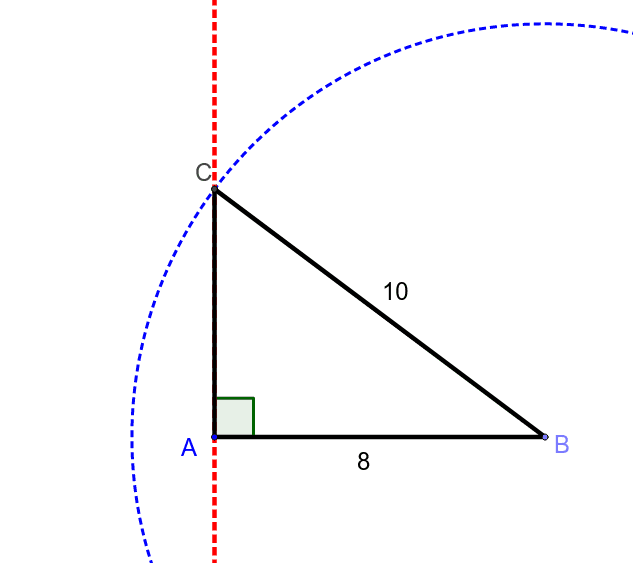
This example demonstrates the relationship between the hypotenuse and the legs of a right triangle. Key mathematical concepts include triangle properties, the Pythagorean theorem, and geometric construction. Construction involves using GeoGebra commands like Point, Segment, OrthogonalLine, Circle, and Intersect to create the right triangle and verify the hypotenuse relationship. Suitable for middle school students learning geometry fundamentals or for mathematical teaching demonstrations.
GeoGebra Commands & Parameters
Point(Circle[A, 8]) → BSegment(A, B) → aOrthogonalLine(A, a) → bCircle(B, 10) → cIntersect(c, b, 2) → CSegment(A, C) → dSegment(B, C) → eAngle(B, A, C) → α
AI Drawing Prompt Reference
Draw a right-angled triangle. The triangle has a right angle, two legs, and a hypotenuse. The hypotenuse is the square root of the sum of the squares of the legs. Construct it by drawing a point, a line segment, a perpendicular line, a circle, and finding the intersection of the circle and the perpendicular line to form the triangle.
The prompt above was compiled from the original drawing commands and is for reference only.