
Side-Side-Side Triangle Construction
Loading the math board and drawing, please wait…
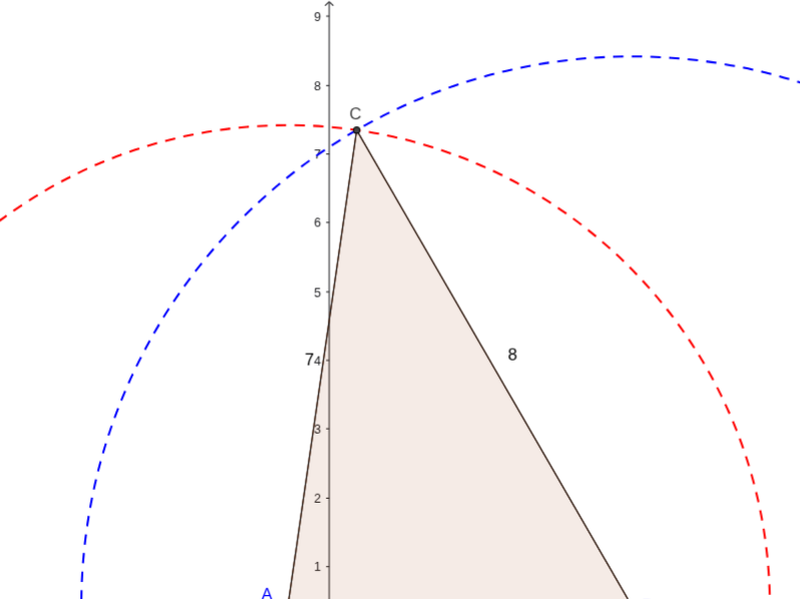
This example demonstrates constructing an isosceles triangle using side lengths. Key mathematical concepts include triangle congruence, geometric construction, and coordinate geometry. The construction involves GeoGebra commands such as Point, Segment, Circle, and Intersect to create triangle objects. Suitable for middle school students learning geometry fundamentals or for math teaching demonstrations.
GeoGebra Commands & Parameters
Point(Circle[A, 5]) → BSegment(A, B) → aCircle(A, 7) → cCircle(B, 8) → dIntersect(c, d, 1) → CPolygon(B, A, C) → poly1, c_1, b, a_1Segment(A, B) → eSegment(B, C) → fSegment(C, A) → g
AI Drawing Prompt Reference
Draw an isosceles triangle. The triangle has two equal sides and a base. First, draw a point, then a line segment, then two circles with radii 5 and 7, and find their intersection as the third vertex. Ensure the triangle is correctly shaped and lines are clear.
The prompt above was compiled from the original drawing commands and is for reference only.