
Triangle Construction and Geometric Transformation
Loading the math board and drawing, please wait…
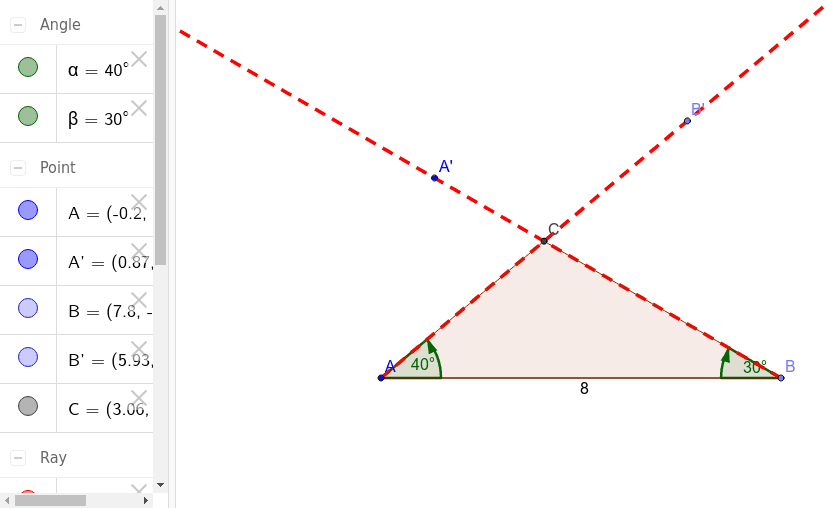
This example demonstrates the construction of a triangle through rotation and scaling operations. The key mathematical concepts include geometric transformations, triangle properties, and coordinate geometry. The construction involves using GeoGebra commands such as Point, Segment, Rotate, Angle, and Intersect to create objects. It is suitable for middle or high school mathematics courses to understand geometric transformations and basic triangle properties.
GeoGebra Commands & Parameters
Point(Circle[A, 8]) → BSegment(A, B) → aRotate(B, 40*°, A) → B'Angle(B, A, B') → αRotate(A, -30*°, B) → A'Angle(A', B, A) → βRay(A, B') → bRay(B, A') → cIntersect(b, c) → CPolygon(A, C, B) → poly1, b_1, a_1, c_1
AI Drawing Prompt Reference
Draw a triangle by first creating a line segment, then marking a point on a circle centered at one end of the segment and connecting it to form another line segment. Rotate this point around the first end by 40 degrees to get a new point, and connect it to the other end. Next, rotate the first end by -30 degrees to get another point, and connect this point to the rotated point. The intersection of these two lines gives the third vertex of the triangle. Finally, connect the three points to form the triangle and display all segments and angles.
The prompt above was compiled from the original drawing commands and is for reference only.