
Rhombus with Fixed Angles
Loading the math board and drawing, please wait…
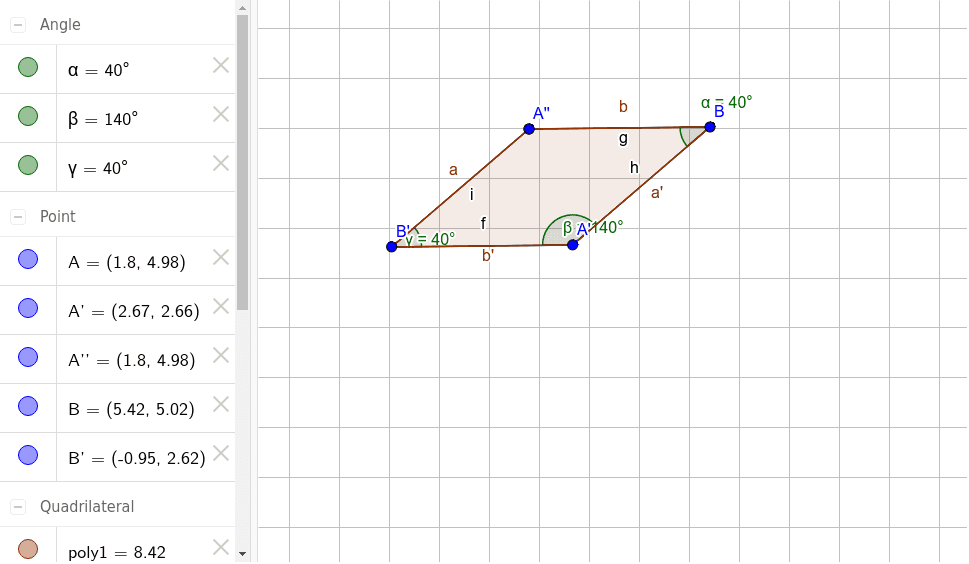
This example demonstrates a rhombus with fixed angles. Key mathematical concepts include the properties of a rhombus and angles. Using commands such as Rotate, Angle, and Segment, a rhombus with fixed angles can be constructed. Suitable for middle school and above students for geometric construction.
GeoGebra Commands & Parameters
Rotate(A, 40°, B) → A'Angle(A, B, A') → αRotate(B, 140°, A') → B'Angle(B, A', B') → βRotate(A', 40°, B') → A''Angle(A', B', A'') → γSegment(A', B') → fSegment(A, B) → gSegment(B, A') → hSegment(B', A) → iPolygon(B', A', B, A) → poly1, b', a', b, a
AI Drawing Prompt Reference
Draw a rhombus with fixed angles. Start with a horizontal base segment. Rotate its right endpoint 40 degrees counterclockwise around the left endpoint to create a slanted side, and mark the 40-degree angle. Then rotate the original right endpoint 140 degrees counterclockwise around the new point to form another side, marking that angle. Next, rotate the previous point 40 degrees around the latest point to get the fourth vertex, and mark the angle. Finally, connect all four vertices to complete the rhombus, showing all sides.
The prompt above was compiled from the original drawing commands and is for reference only.