
Rhombus Stacking
Loading the math board and drawing, please wait…
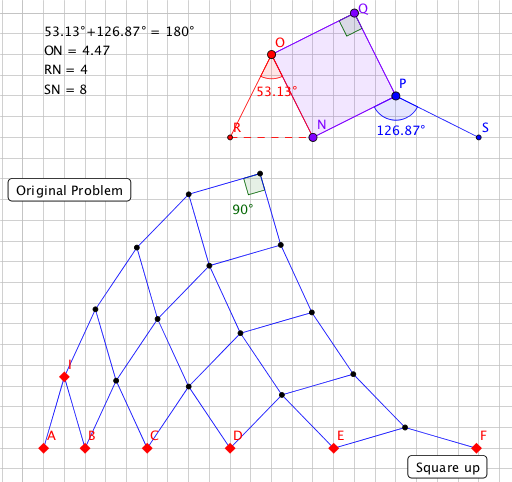
This example demonstrates a geometry challenge involving rhombus stacking. Key mathematical concepts include rhombus, square, and geometric transformations. Using GeoGebra commands such as point, midpoint, intersect, segment, mirror, angle, polygon, etc., the construction of rhombus stacking is shown. Suitable for middle school and above students or teachers for teaching purposes.
GeoGebra Commands & Parameters
Point(Ray[A, A + (1, 0)]) → BPoint(Ray[B, B + (1, 0)]) → CPoint(Ray[C, C + (1, 0)]) → DPoint(Ray[D, D + (1, 0)]) → EPoint(Ray[E, E + (1, 0)]) → FMidpoint(A, B) → GIntersect(Circle[A, d], Ray[G, G + (0, 1)]) → H,Point(Ray[H, H + (0, 1)]) → ISegment(A, I) → fSegment(B, I) → gIntersect(Circle[B, f], Ray[Midpoint[B, C], Midpoint[B, C] + (0, 1)]) → J,Intersect(Circle[C, f], Ray[Midpoint[D, C], Midpoint[D, C] + (0, 1)]) → K,Intersect(Circle[D, f], Ray[Midpoint[D, E], Midpoint[D, E] + (0, 1)]) → L, TIntersect(Circle[E, f], Ray[Midpoint[F, E], Midpoint[F, E] + (0, 1)]) → M,Segment(B, J) → hSegment(J, C) → iSegment(C, K) → jSegment(K, D) → kSegment(D, L) → lSegment(L, E) → mSegment(E, M) → nSegment(M, F) → pMirror(B, Midpoint[I, J]) → B'Mirror(C, Midpoint[K, J]) → C'Mirror(D, Midpoint[K, L]) → D'Mirror(E, Midpoint[M, L]) → E'Segment(I, B') → qSegment(J, B') → rSegment(J, C') → sSegment(C', K) → tSegment(K, D') → aSegment(D', L) → bSegment(L, E') → cSegment(E', M) → eMirror(J, Midpoint[B', C']) → J'Mirror(K, Midpoint[D', C']) → K'Mirror(L, Midpoint[D', E']) → L'Segment(B', J') → f_1Segment(J', C') → g_1Segment(C', K') → h_1Segment(K', D') → i_1Segment(D', L') → j_1Segment(L', E') → k_1Mirror(C', Midpoint[J', K']) → C''Mirror(D', Midpoint[L', K']) → D''Mirror(K', Midpoint[C'', D'']) → K''Segment(J', C'') → l_1Segment(C'', K') → m_1Segment(K', D'') → n_1Segment(D'', L') → p_1Segment(C'', K'') → q_1Segment(K'', D'') → r_1Angle(C'', K'', D'') → αPolygon(O, N, 4) → poly1, s_1, t_1, a_1, b_1, P, QCircle(O, N) → d_1Circle(P, N) → e_1Intersect(d_1, c_1, 1) → RIntersect(e_1, c_1, 2) → SSegment(R, O) → f_2Segment(S, P) → g_2Angle(R, O, N) → βAngle(N, P, S) → γIntersect(Circle[A, d'], Ray[G, G + (0, 1)]) → I',Segment(R, N) → h_2Angle(O, Q, P) → δSegment(A, B) → i_2Segment(E, F) → j_2
AI Drawing Prompt Reference
Draw a stacked pattern of rhombuses. Start by placing points A, B, C, D, E, and F on a line. Then construct the vertices of each rhombus by finding intersection points and using reflections. Connect these points to form rhombuses, and use reflections to create more rhombuses, forming a stacked pattern.
The prompt above was compiled from the original drawing commands and is for reference only.