
Rhombus, Square, and Trapezoid: Geometric Construction and Properties
Loading the math board and drawing, please wait…
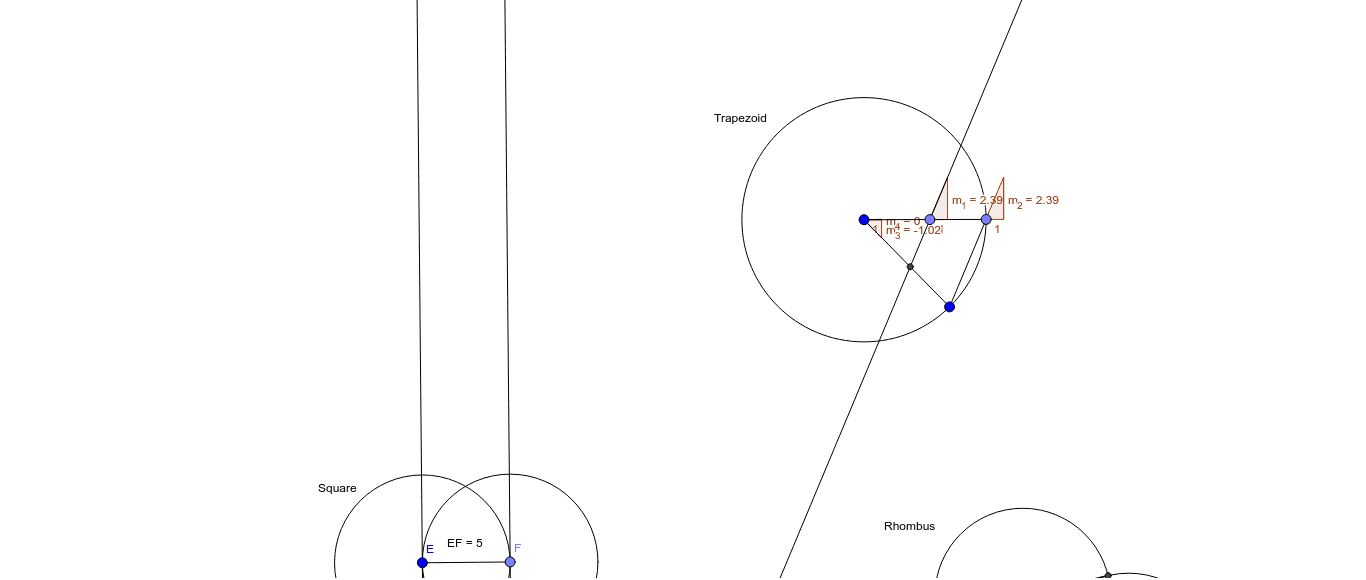
①This GeoGebra example dynamically demonstrates the construction and interrelationships of three special quadrilaterals—rhombus, square, and trapezoid—along with derived elements such as isosceles triangles and trigonometric functions. ②Core mathematical concepts include definitions and properties of quadrilaterals (e.g., diagonals of a rhombus are perpendicular bisectors, a square has equal sides and right angles, a trapezoid has exactly one pair of parallel sides), isosceles triangle criteria, and trigonometric functions used in angle calculations. ③Construction details: Based on the summary, the example uses GeoGebra commands such as Circle, Intersect, Segment, Angle, Point, OrthogonalLine, Distance, Line, and Slope, creating objects like vertices A, B, C, D, sides a, b, e, f, angles α, β, γ, δ, and distance measurements (distanceHG, distanceEF, etc.) with text labels (TextHG, TextEF) to verify geometric relationships. ④This is suitable for middle and high school geometry classes, helping students intuitively understand quadrilateral classification, property proofs, and dynamic exploration of geometric quantities, and can serve as a reference for teachers creating interactive lessons.
GeoGebra Commands & Parameters
Circle(A, 5) → cCircle(B, 5) → dIntersect(c, d, 1) → CIntersect(c, d, 2) → DSegment(A, C) → aSegment(B, C) → bSegment(A, D) → eSegment(D, B) → fAngle(A, C, B) → αAngle(B, D, A) → βAngle(C, B, D) → γAngle(D, A, C) → δCircle(E, 5) → gPoint(g) → FSegment(E, F) → hCircle(F, 5) → kOrthogonalLine(F, h) → iIntersect(k, i, 1) → GOrthogonalLine(G, i) → jOrthogonalLine(E, h) → lDistance(i, h) → mDistance(j, l) → nIntersect(g, j, 2) → HDistance(j, l) → oDistance(H, G) → distanceHGDistance(E, F) → distanceEFDistance(F, G) → distanceFGDistance(E, H) → distanceEHCircle(I, J) → pSegment(I, J) → qPoint(p) → KSegment(I, K) → rSegment(K, J) → sPoint(r) → LLine(L, s) → tIntersect(t, q) → MSlope(t) → m_1Slope(s) → m_2Slope(q) → m_3Slope(r) → m_4
AI Drawing Prompt Reference
Draw three special quadrilaterals: a rhombus, a square, and a trapezoid. Start with two circles of radius 5 centered at points 5 units apart; their intersections define the rhombus vertices, and mark its four interior angles. Then construct a square by drawing a circle, taking a point on it, drawing a perpendicular line through that point, and completing the square; measure its side lengths and diagonals. Finally, draw a circle with a diameter, pick a point on the circle, form a triangle, draw a line through that point parallel to one side, intersect it with the diameter, and measure the slopes of the sides to verify trapezoid properties.
The prompt above was compiled from the original drawing commands and is for reference only.