
Rhombus Explorer
Loading the math board and drawing, please wait…
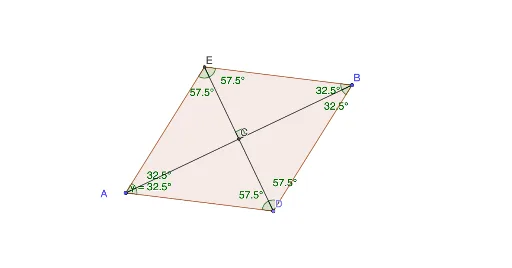
This example demonstrates the properties of a rhombus. Key mathematical concepts include the definition of a rhombus, the properties of its diagonals, and its relationship with isosceles triangles. Using GeoGebra commands such as Segment, Midpoint, and LineBisector, you can dynamically construct a rhombus and observe its changes. Suitable for middle school and above students or teachers.
GeoGebra Commands & Parameters
Segment(A, B) → fMidpoint(f) → CLineBisector(f) → gPoint(g) → DCircle(C, D) → cIntersect(c, g, 2) → ESegment(D, E) → hAngle(E, C, B) → αPolygon(A, D, B, E) → q1, a, d, b, eAngle(B, A, D) → βAngle(E, A, B) → γAngle(B, E, D) → δAngle(D, E, A) → εAngle(D, B, A) → ζAngle(A, B, E) → ηAngle(A, D, E) → θAngle(E, D, B) → ι