
Trigonometric Limit Demonstration
Loading the math board and drawing, please wait…
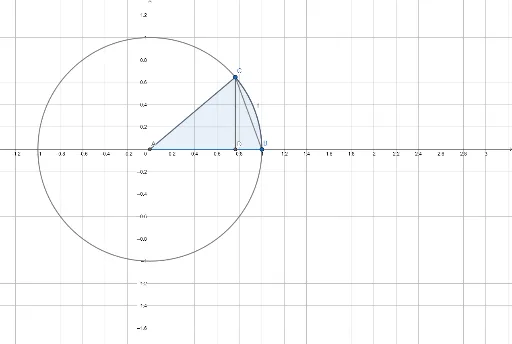
This example demonstrates the calculation and geometric representation of trigonometric limits near specific points. It involves core math concepts like limits, trigonometric functions, and analytical geometry. The construction uses GeoGebra commands such as Intersect, Circle, Point, Segment, OrthogonalLine, CircleSector, and CircleArc. Suitable for high school and above students to learn about limits in calculus and properties of trigonometric functions.
GeoGebra Commands & Parameters
Intersect(xAxis, yAxis) → ACircle(A, B) → cPoint(c) → CSegment(A, C) → fOrthogonalLine(C, xAxis) → gIntersect(g, xAxis) → DSegment(C, D) → hSegment(C, B) → iSegment(D, C) → jCircleSector(A, B, C) → dCircleArc(A, B, C) → t
AI Drawing Prompt Reference
Draw a coordinate plane with a unit circle centered at the origin passing through (1,0). Choose a point on the circle, join it to the origin to form a radius. Drop a perpendicular from that point to the x‑axis, marking the foot, and draw the vertical segment. Connect the point on the circle to (1,0) to form a chord. Finally shade the sector bounded by the radius to (1,0), the radius to the chosen point, and the arc between them, and highlight that arc, illustrating the geometric setup for a trigonometric limit.
The prompt above was compiled from the original drawing commands and is for reference only.