
Interactive Infinite Limits and Limits at Infinity
Loading the math board and drawing, please wait…
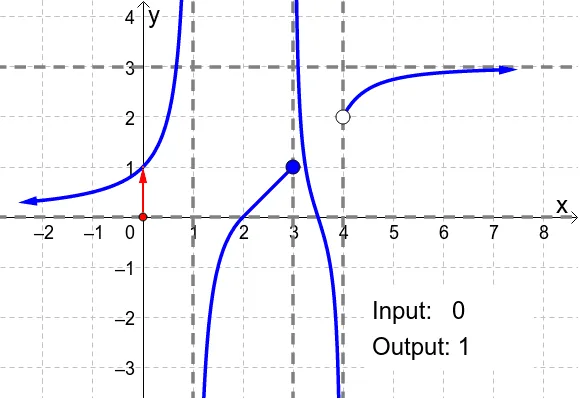
This GeoGebra applet dynamically demonstrates how outputs behave as inputs approach critical values or move toward positive/negative infinity, illustrating infinite limits and limits at infinity. It focuses on the core ideas of divergence to ±∞ and the interpretation of lim_{x→±∞} in an intuitive, geometric way. The construction uses GeoGebra primitives from the provided build summary: Point to define key positions (e.g., H, K, L, M, N and other auxiliary points), Polygon to build a visual geometric setup (e.g., poly1 and related polygonal elements), and Vector to encode direction and proportional relationships in the diagram (e.g., vector-like objects such as u, v and related constructs). Additional helper objects (k, l, m, n, f, a, b, A, B, g, and labels like text1 and other annotated text elements) support the visualization and interpretation of the current input-to-output behavior. Suitable for calculus instruction, especially for introducing limit concepts through interactive visualization and student exploration.
GeoGebra Commands & Parameters
Point(xAxis) → HPolygon(K, L, M, N) → poly1, k, l, m, nVector(H, (x(H), f(x(H)))) → aVector((x(H), f(x(H))), (0, f(x(H)))) → bVector(((-2), f((-2))), ((-2.5), f((-2.5)))) → uVector((7, f(7)), (7.5, f(7.5))) → v
AI Drawing Prompt Reference
Draw a dynamic illustration of how outputs behave as inputs approach critical values or infinity. Start by placing a point H on the x-axis, then create a quadrilateral with points K, L, M, and N. Draw a vector a from H to the function value, and a vector b from the function value to the y-axis. Finally, draw vectors u from x=-2 to x=-2.5 and v from x=7 to x=7.5 to show the function's behavior at infinity.
The prompt above was compiled from the original drawing commands and is for reference only.