
Interactive Infinite Limits and Limits at Infinity by Renata
Loading the math board and drawing, please wait…
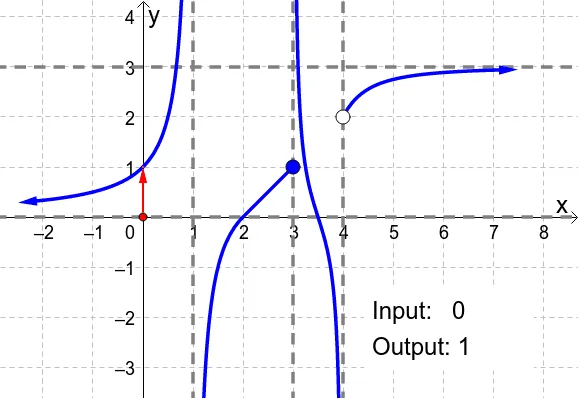
This GeoGebra applet interactively demonstrates infinite limits and limits at infinity by dragging the red point along the x-axis to show how the output behaves as inputs grow without bound (or move toward infinity). It focuses on core calculus ideas: “infinite limits” (diverging toward ±∞) and “limits at infinity” (the limiting behavior as x → ±∞), linking the numeric behavior to the visual geometry in the graph. The construction uses GeoGebra commands such as Point, Polygon, and Vector to build multiple key points (e.g., H, K, L, M, N and related points k, l, m, n), assemble polygonal/connected shapes (poly1) for the visualization framework, and employ vector/arrow-like objects (e.g., g, u, v) to guide interpretation; text labels (text1) help annotate what is being shown. Parameter and function variables (f, a, b, A, B, plus c–e and h–i style parameters) drive the dynamic behavior. Suitable for secondary-school advanced calculus introductions, early university calculus, classroom demonstrations, and self-study of limit concepts through visual reasoning.
GeoGebra Commands & Parameters
Point(xAxis) → HPolygon(K, L, M, N) → poly1, k, l, m, nVector(H, (x(H), f(x(H)))) → aVector((x(H), f(x(H))), (0, f(x(H)))) → bVector(((-2), f((-2))), ((-2.5), f((-2.5)))) → uVector((7, f(7)), (7.5, f(7.5))) → v
AI Drawing Prompt Reference
Create a coordinate graphic for demonstrating infinite limits and limits at infinity: place a draggable red point on the horizontal x-axis, and at the current x-position use the function value to build vector visuals. From the point at (x, f(x)), draw one vector starting at that function point, and another vector that begins at the same height on the vertical line and extends horizontally to (0, f(x)). Also include two fixed short vectors located near x = -2 and near x = 7, each drawn between two close x positions (around -2 to -2.5, and 7 to 7.5) using the corresponding f values. Keep the vector endpoints tied to the function graph behavior as x changes.
The prompt above was compiled from the original drawing commands and is for reference only.