
Demonstration of Trigonometric Function Limits
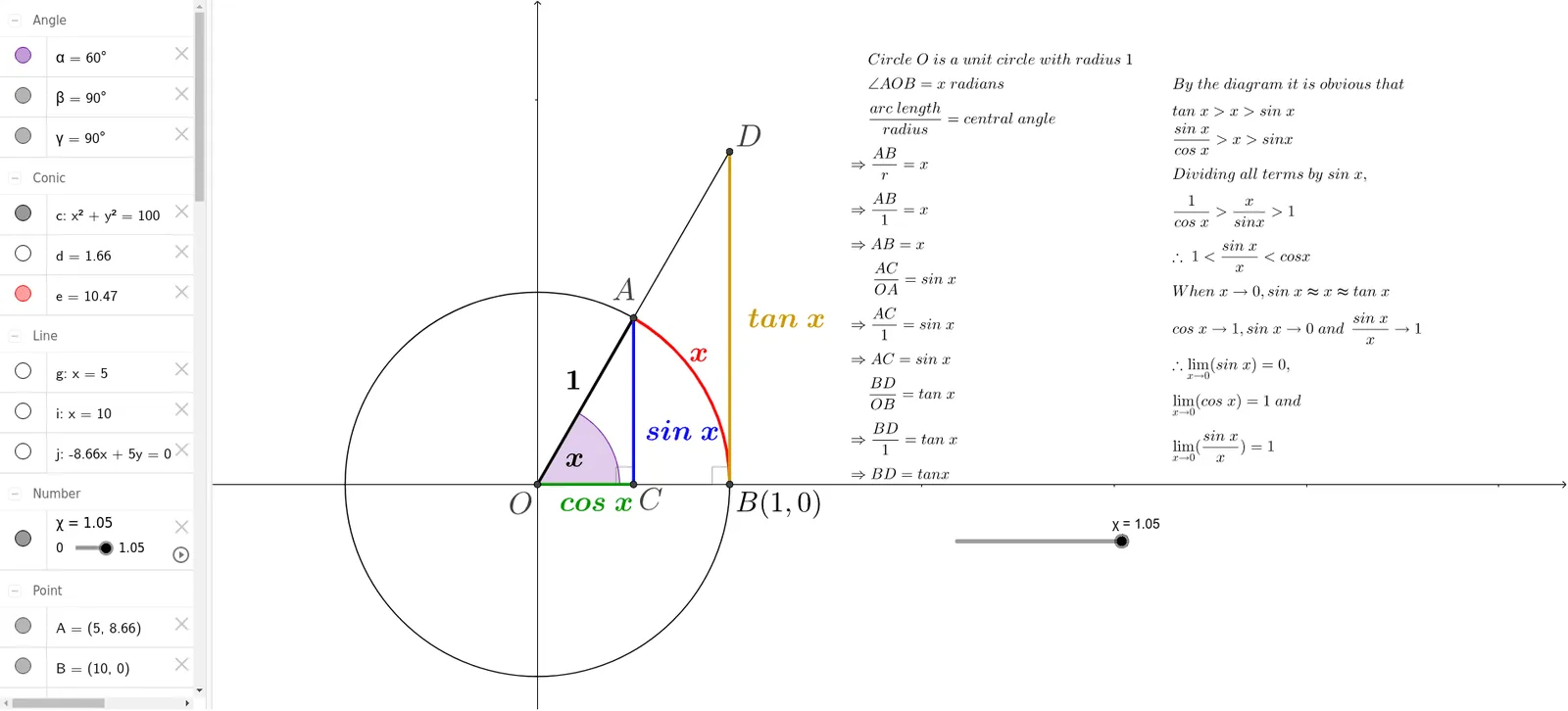
Loading the math board and drawing, please wait…
This example dynamically illustrates the behavior of trigonometric functions near specific points, showcasing limits, trigonometric functions, derivatives, and geometric intuition. It constructs key elements using GeoGebra commands like Intersect, Circle, Segment, OrthogonalLine, Line, Angle, Point, and CircleArc. Suitable for high school students and calculus beginners.
GeoGebra Commands & Parameters
Intersect(xAxis, yAxis) → OCircle(O, 10) → cIntersect(c, xAxis, 2) → BSegment(A, O) → fOrthogonalLine(A, xAxis) → gIntersect(g, xAxis) → CSegment(A, C) → hOrthogonalLine(B, xAxis) → iLine(O, A) → jIntersect(j, i) → DSegment(D, A) → kSegment(D, B) → lAngle(B, O, A) → αPoint(f) → EPoint(xAxis) → FCircleArc(O, F, E) → dCircleArc(O, B, A) → eSegment(O, C) → mPoint(d) → GPoint(h) → HPoint(m) → IPoint(e) → JPoint(l) → KPoint(f) → LAngle(A, C, O) → βAngle(D, B, O) → γ
AI Drawing Prompt Reference
Draw a unit circle centered at O with radius 10. Take point B on the x-axis such that OB=2. Draw a perpendicular from A to the x-axis, intersecting at C, and connect OC. Draw a perpendicular from B to the x-axis, intersecting the line OA at D, and connect OD. Draw the angle bisector of AOB, intersecting the perpendicular from B at E, and connect OE. Take point F on the x-axis such that OF=OE, and draw a circular arc d centered at O with radius OE. Draw a circular arc e centered at B with radius BA. Connect OC, intersecting d at G, intersecting the perpendicular from B at H, intersecting OA at I, intersecting e at J, and intersecting AB at K. Connect OE, intersecting the perpendicular from B at L. Mark angles AOB as α, BOC as β, and DOB as γ.
The prompt above was compiled from the original drawing commands and is for reference only.