
Rhombus Calculator
Loading the math board and drawing, please wait…
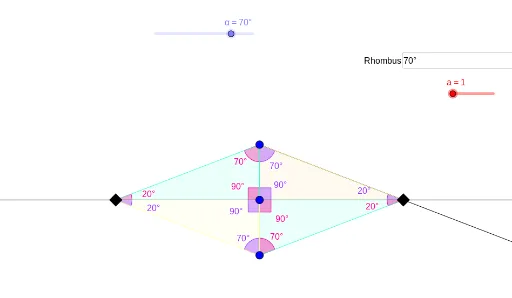
This example demonstrates the geometric properties and calculations of a rhombus. It involves core mathematical concepts such as polygons, vectors, 2D coordinate geometry, linear equations, and angle calculations. Construction highlights include using commands like Textfield, Rotate, Segment, OrthogonalLine, Ray, Intersect, Mirror, Polygon, and InteriorAngles in GeoGebra for drawing and computing the rhombus and related elements. Suitable for high school mathematics teaching and geometric construction learning.
GeoGebra Commands & Parameters
Textfield(α) → InputBox1Rotate(A, α, B) → A'Segment(B, A) → fOrthogonalLine(A, f) → gRay(B, A') → hIntersect(g, h) → CMirror(C, A) → C'Mirror(B, A) → B'Polygon(B, A, C) → t1, c_1, b_1, a_1Polygon(C, A, B') → t2, b', c_2, a_2Polygon(B, C', A) → t3, a_3, b_2, c'Polygon(C', B', A) → t4, a_4, i, jInteriorAngles(t3) → γ, δ, εInteriorAngles(t2) → ζ, η, θInteriorAngles(t4) → ι, κ, λInteriorAngles(t1) → μ, ν, ξ
AI Drawing Prompt Reference
Draw a rhombus to demonstrate its geometric properties and calculations. Start by creating two intersecting line segments, then use rotation and reflection to generate the four vertices of the rhombus. Connect the vertices with line segments to form the rhombus, and label its four interior angles. Finally, differentiate the four triangles within the rhombus using different colors or styles, and label their interior angles to highlight the symmetry and angle relationships.
The prompt above was compiled from the original drawing commands and is for reference only.