
Rhombus Activity
Loading the math board and drawing, please wait…
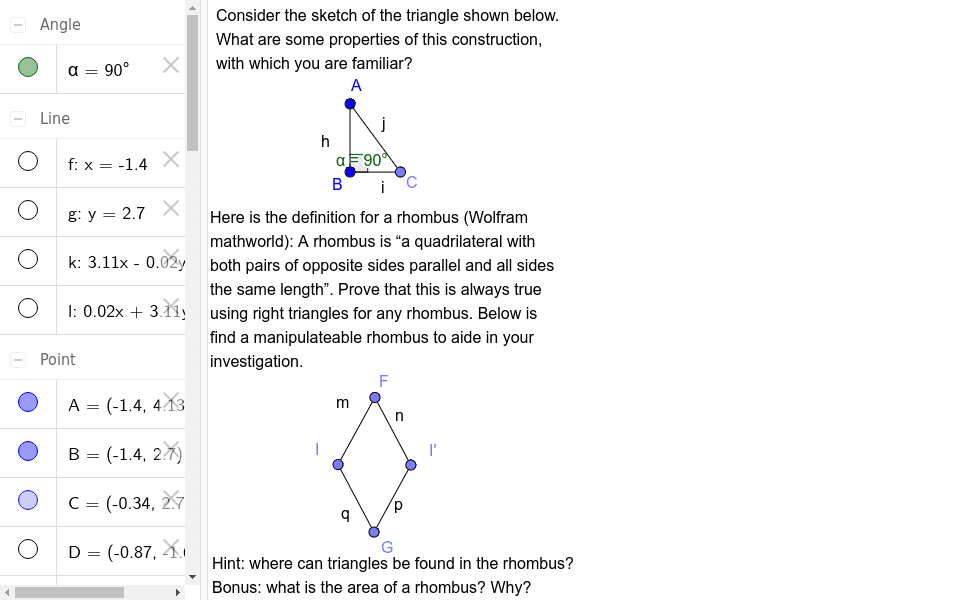
This example demonstrates the geometric properties of a rhombus and its dynamic relationships with related shapes. Core math concepts include rhombus, ellipse, sequences and series, tangent line, scatter plot, LCM and GCD. Construction highlights from the GeoGebra command summary involve commands like Line, OrthogonalLine, Point, Segment, Angle, Midpoint, Mirror, and objects such as text1, A, B, f, g, C, h, i, j, α, text2, D, E, k, F, G, H, l, I, I', m, n, p, q, text3. Suitable for high school mathematics teaching, exploring the connections between the rhombus and other shapes and geometric construction techniques.
GeoGebra Commands & Parameters
Line(A, B) → fOrthogonalLine(B, f) → gPoint(g) → CSegment(A, C) → hSegment(C, B) → iSegment(B, A) → jAngle(C, B, A) → αLine(D, E) → kPoint(k) → FPoint(k) → GMidpoint(F, G) → HOrthogonalLine(H, k) → lPoint(l) → IMirror(I, k) → I'Segment(I, F) → mSegment(F, I') → nSegment(I', G) → pSegment(G, I) → q
AI Drawing Prompt Reference
Draw a horizontal segment as the base. Through its right endpoint, construct a perpendicular line and pick a point on it. Connect this point to both endpoints of the base to form a right triangle, and mark the angle at the left endpoint. Then, on another line, choose two points, connect them, find their midpoint, and draw a perpendicular through the midpoint. Pick a point on this perpendicular, reflect it across the original line, and connect the four points in order to form a rhombus.
The prompt above was compiled from the original drawing commands and is for reference only.