
Rhombitrihexagonal Tiling
Loading the math board and drawing, please wait…
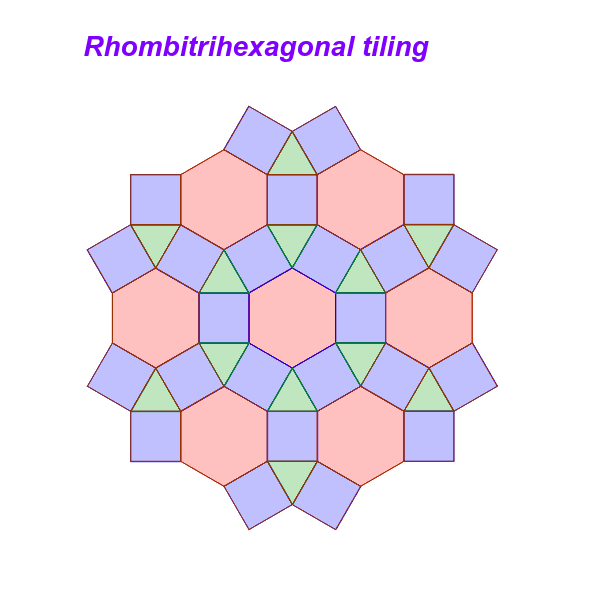
This example demonstrates the rhombitrihexagonal tiling, showcasing rotational and translational symmetry, and exercises in measuring the angles of regular polygons. Using GeoGebra commands such as Point, Intersect, and Polygon, students can practice drawing and understanding tessellations. Suitable for middle school and above students to learn geometric construction and symmetry.
GeoGebra Commands & Parameters
Point(yAxis) → AIntersect(xAxis, yAxis) → BPolygon(A, B, 6) → poly1, a, F, b, c, d, e, f, C, D, EPolygon(F, E, 4) → poly2, g, h, i, j, G, HPolygon(E, D, 4) → poly3, k, l, m, n, I, JPolygon(D, C, 4) → poly4, p, q, r, s, K, LPolygon(C, B, 4) → poly5, t, a_1, b_1, c_1, M, NPolygon(B, A, 4) → poly6, d_1, e_1, f_1, g_1, O, PPolygon(A, F, 4) → poly7, h_1, i_1, j_1, k_1, Q, RPolygon(E, J, 3) → poly8, l_1, m_1, n_1, SPolygon(F, H, 3) → poly9, p_1, q_1, r_1, TPolygon(A, R, 3) → poly10, s_1, t_1, a_2, UPolygon(B, P, 3) → poly11, b_2, c_2, d_2, VPolygon(C, N, 3) → poly12, e_2, f_2, g_2, WPolygon(D, L, 3) → poly13, h_2, i_2, j_2, ZPolygon(H, G, 6) → poly14, k_2, D_1, l_2, m_2, n_2, p_2, q_2, A_1, B_1, C_1Polygon(R, Q, 6) → poly15, r_2, H_1, s_2, t_2, a_3, b_3, c_3, E_1, F_1, G_1Polygon(P, O, 6) → poly16, d_3, L_1, e_3, f_3, g_3, h_3, i_3, I_1, J_1, K_1Polygon(N, M, 6) → poly17, j_3, P_1, k_3, l_3, m_3, n_3, p_3, M_1, N_1, O_1Polygon(L, K, 6) → poly18, q_3, T_1, r_3, s_3, t_3, a_4, b_4, Q_1, R_1, S_1Polygon(J, I, 6) → poly19, c_4, Z_1, d_4, e_4, f_4, g_4, h_4, U_1, V_1, W_1Polygon(G, J, 4) → poly20, i_4, j_4, k_4, l_4, A_2, B_2Polygon(H, D_1, 4) → poly21, m_4, n_4, p_4, q_4, C_2, D_2Polygon(O, R, 4) → poly22, r_4, s_4, t_4, a_5, E_2, F_2Polygon(M, P, 4) → poly23, b_5, c_5, d_5, e_5, G_2, H_2Polygon(K, N, 4) → poly24, f_5, g_5, h_5, i_5, I_2, J_2Polygon(I, L, 4) → poly25, j_5, k_5, l_5, m_5, K_2, L_2Polygon(D_1, C_1, 4) → poly26, n_5, p_5, q_5, r_5, M_2, N_2Polygon(F_1, E_1, 4) → poly27, s_5, t_5, a_6, b_6, O_2, P_2Polygon(B_1, A_1, 4) → poly28, c_6, d_6, e_6, f_6, Q_2, R_2Polygon(Z_1, W_1, 4) → poly29, g_6, h_6, i_6, j_6, S_2, T_2Polygon(V_1, U_1, 4) → poly30, k_6, l_6, m_6, n_6, U_2, V_2Polygon(T_1, S_1, 4) → poly31, p_6, q_6, r_6, s_6, W_2, Z_2Polygon(R_1, Q_1, 4) → poly32, t_6, a_7, b_7, c_7, A_3, B_3Polygon(P_1, O_1, 4) → poly33, d_7, e_7, f_7, g_7, C_3, D_3Polygon(N_1, M_1, 4) → poly34, h_7, i_7, j_7, k_7, E_3, F_3Polygon(L_1, K_1, 4) → poly35, l_7, m_7, n_7, p_7, G_3, H_3Polygon(J_1, I_1, 4) → poly36, q_7, r_7, s_7, t_7, I_3, J_3Polygon(H_1, G_1, 4) → poly37, a_8, b_8, c_8, d_8, K_3, L_3Polygon(I_1, H_1, 3) → poly38, e_8, f_8, g_8, M_3Polygon(E_1, D_1, 3) → poly39, h_8, i_8, j_8, N_3Polygon(A_1, Z_1, 3) → poly40, k_8, l_8, m_8, O_3Polygon(U_1, T_1, 3) → poly41, n_8, p_8, q_8, P_3Polygon(Q_1, P_1, 3) → poly42, r_8, s_8, t_8, Q_3Polygon(M_1, L_1, 3) → poly43, a_9, b_9, c_9, R_3
AI Drawing Prompt Reference
Draw a rhombitrihexagonal tiling with regular hexagons, squares, and triangles. Start by drawing a hexagon, then draw squares and triangles around it, making sure they intersect and connect properly to form the tiling pattern.
The prompt above was compiled from the original drawing commands and is for reference only.