
Subdividing Triangles into Six Isosceles Triangles
Loading the math board and drawing, please wait…
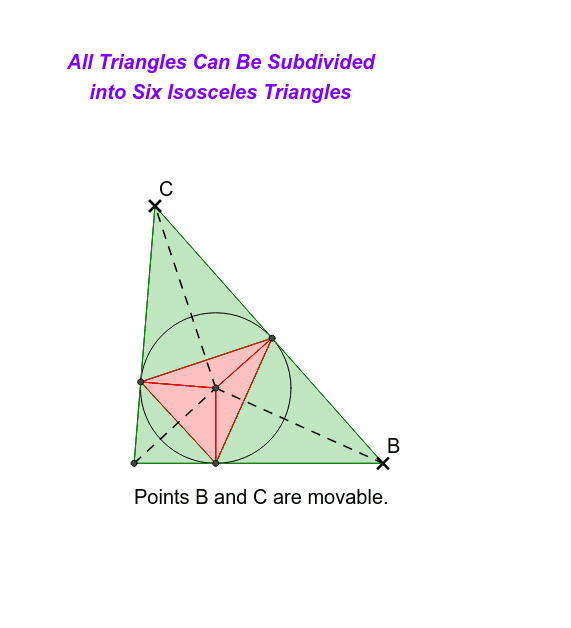
This example demonstrates how to subdivide a triangle into six isosceles triangles using angle bisectors of the incircle. Key math concepts include isosceles triangles, angle bisectors, incircles, and trigonometry. GeoGebra commands used in construction are Intersect, Point, Polygon, AngularBisector, OrthogonalLine, Circle, and Segment. Suitable for high school geometry instruction on geometric constructions and transformations.
GeoGebra Commands & Parameters
Intersect(xAxis, yAxis) → APoint(xAxis) → BPolygon(A, B, C) → poly1, c, a, bAngularBisector(b, a) → d, eAngularBisector(b, c) → f, gIntersect(e, g) → DOrthogonalLine(D, b) → hOrthogonalLine(D, a) → iOrthogonalLine(D, c) → jIntersect(h, b) → EIntersect(j, c) → FIntersect(i, a) → GCircle(D, G) → kPolygon(F, G, E) → poly2, e_1, f_1, g_1Segment(D, E) → lSegment(G, D) → mSegment(D, F) → nPolygon(F, B, G) → poly3, g_2, f_2, b_1Polygon(F, E, A) → poly4, a_1, f_3, e_2Polygon(C, E, G) → poly5, g_3, c_1, e_3Polygon(D, F, G) → poly6, g_4, d_1, f_4Polygon(D, G, E) → poly7, e_4, d_2, g_5Polygon(D, F, E) → poly8, e_5, d_3, f_5Segment(A, D) → pSegment(D, C) → qSegment(D, B) → r
AI Drawing Prompt Reference
Draw a triangle with its base on the horizontal axis, one vertex at the origin, and another vertex on the base. From an interior point (the incenter), drop perpendiculars to all three sides, marking the feet on each side. Construct a circle centered at the incenter passing through one of these feet, tangent to all sides. Connect the incenter to the three feet, dividing the triangle into six smaller triangles. Then connect the incenter to the three original vertices. The final figure shows six isosceles triangles arranged symmetrically within the original triangle.
The prompt above was compiled from the original drawing commands and is for reference only.