
Rhombicosidodecahedron Vertex Set on a Sphere: 60 Vertices (c-Variant)
Loading the math board and drawing, please wait…
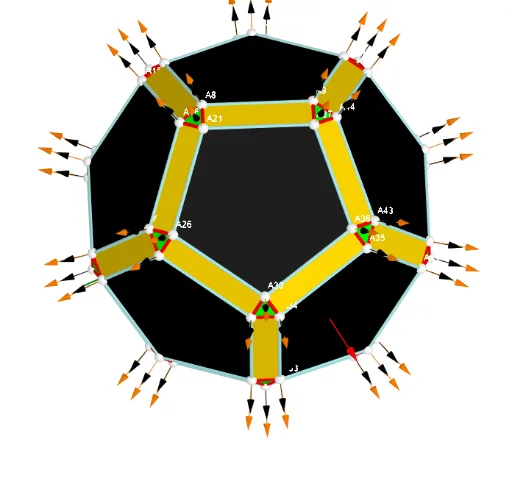
This example visualizes a Rhombicosidodecahedron’s symmetric vertex configuration mapped onto a sphere, using 60 vertices to reveal the structure and relationships between points. The main mathematical ideas include highly symmetric polyhedra (regular/semiregular polyhedron concepts), spherical geometry and point-set placement, spatial vectors, and geometric construction via systematic indexing/labeling. Construction highlights: Sphere is used to create the spherical surface; point objects such as Points00 store the 60 vertices; Segments connect corresponding vertices to form edges of the polyhedral network; TableText/Text together with UnicodeToLetter provide vertex labels and annotations. Commands like Sum and Zip are used to aggregate and pair data sets (e.g., for constructing indexed point/label collections). Vector-related objects (lVector1, lVector2, lVector3) and grouping/label objects (e.g., Cm, Wi_P, SumWii_P) help organize the geometry. Suitable for high school to undergraduate solid-geometry, STEM visualization, and computational geometry demonstrations.
GeoGebra Commands & Parameters
UnicodeToLetter(34) → u34Text("" + Um1) → txt_pSum(Flatten[Sequence[Append[Sequence[Element[txt_p, i], i, m01(k), m02(k)], " "], k, 1, 5]]) → txtUm1Zip(Vector[a, a + UnitVector[a]], a, Points00) → lVector1Zip(Vector[a, a + (1.5 * UnitVector[b])], a, Points00, b, Wi_Pc) → lVector2Zip(Vector[a, a + (1.5 * UnitVector[b])], a, Points00, b, Wi_P) → lVector3Sphere((0, 0, 0), 5) → sphTableText(Append["i", 1…n], Append[" \fgcolor{orange}{GM :Δφ_i}, rad", l1w], Append["\fgcolor{magenta}{GC :Δφ_i} , rad", l1cw], "v") → text23rZip(Segment[Element[Points00, y(a)], Element[Points00, z(a)]], a, ll1bb(1)) → ll1Zip(Segment[Element[Points00, y(a)], Element[Points00, z(a)]], a, ll1bb(2)) → ll2Zip(Segment[Element[Points00, y(a)], Element[Points00, z(a)]], a, ll1bb(3)) → ll3Zip(Segment[Element[Points00, y(a)], Element[Points00, z(a)]], a, ll1bb(4)) → ll4Zip(Segment[Element[Points00, y(a)], Element[Points00, z(a)]], a, ll1bb(5)) → ll5Zip(Segment[Element[Points00, y(a)], Element[Points00, z(a)]], a, ll1bb(6)) → ll6Zip(Segment[Element[Points00, y(a)], Element[Points00, z(a)]], a, ll1bb(7)) → ll7Zip(Segment[Element[Points00, y(a)], Element[Points00, z(a)]], a, ll1bb(8)) → ll8Zip(Segment[Element[Points00, y(a)], Element[Points00, z(a)]], a, ll1bb(9)) → ll9Zip(Segment[Element[Points00, y(a)], Element[Points00, z(a)]], a, ll1bb(10)) → ll10
AI Drawing Prompt Reference
Visualize a rhombicosidodecahedron's symmetric vertex configuration on a sphere using 60 vertices, highlighting the structure and relationships between points. Connect vertices with vectors to form the polyhedral network, label vertices, and use a spherical surface to organize the geometry, suitable for demonstrating solid geometry and computational geometry concepts.
The prompt above was compiled from the original drawing commands and is for reference only.