
Rhombic Dodecahedron from Cube Animation
Loading the math board and drawing, please wait…
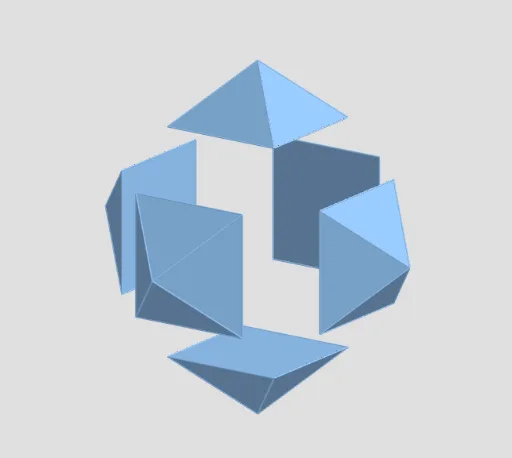
This example demonstrates the dynamic generation of a rhombic dodecahedron from a cube. Key math concepts include polygon construction, solid geometry, and vector operations. The construction leverages GeoGebra commands like Polygon, Pyramid, and If, along with objects such as buttons and sliders. Ideal for high school students and math enthusiasts exploring spatial geometry and dynamic constructions.
GeoGebra Commands & Parameters
Polygon(A3, A7, A1, A5) → poly1, a3, a7, a1, a5Polygon(A7, A6, A4, A1) → poly2, f, a6, a4, gPolygon(A6, A2, A8, A4) → poly3, h, a2, a8, iPolygon(A2, A3, A5, A8) → poly4, j, k, l, mPolygon(A8, A5, A1, A4) → poly5, n, p, q, rPyramid(poly1, C) → P1, faceA3A7C_1, faceA1A7C_1, faceA1A5C_1, faceA3A5C_1, edgeA3C_1, edgeA7C_1, edgeA1C_1, edgeA5C_1Pyramid(poly2, C) → P2, faceA6A7C_1, faceA4A6C_1, faceA1A4C_1, faceA1A7C, edgeA7C_2, edgeA6C_1, edgeA4C_1, edgeA1C_2Pyramid(poly3, C) → P3, faceA2A6C_1, faceA2A8C_1, faceA4A8C_1, faceA4A6C, edgeA6C_2, edgeA2C_1, edgeA8C_1, edgeA4C_2Pyramid(poly4, C) → P4, faceA2A3C_1, faceA3A5C, faceA5A8C_1, faceA2A8C, edgeA2C_2, edgeA3C_2, edgeA5C_2, edgeA8C_2Pyramid(poly5, C) → P5, faceA5A8C, faceA1A5C, faceA1A4C, faceA4A8C, edgeA8C, edgeA5C, edgeA1C, edgeA4CIf(0 ≤ t ≤ 1, Translate[P1, Vector[(0, 0, 0), (t, 0, 0)]], If[1 < t ≤ 2, Rotate[Translate[P1, Vector[(0, 0, 0), (1, 0, 0)]], (π * (t - 1)), Line[(2, 0, 0), (2, 0, 1)]], Translate[Rotate[Translate[P1, Vector[(0, 0, 0), (1, 0, 0)]], π, Line[(2, 0, 0), (2, 0, 1)]], Vector[(0, 0, 0), ((-t) + 2, 0, 0)]]]) → P1APolygon(A2, A3, A7, A6) → poly6, s, a, b, cPyramid(poly6, C) → P6, faceA2A3C, faceA3A7C, faceA6A7C, faceA2A6C, edgeA2C, edgeA3C, edgeA7C, edgeA6CIf(0 ≤ t ≤ 1, Translate[P2, Vector[(0, 0, 0), (0, t, 0)]], If[1 < t ≤ 2, Rotate[Translate[P2, Vector[(0, 0, 0), (0, 1, 0)]], (π * (t - 1)), Line[(0, 2, 0), (0, 2, 1)]], Translate[Rotate[Translate[P2, Vector[(0, 0, 0), (0, 1, 0)]], π, Line[(0, 2, 0), (0, 2, 1)]], Vector[(0, 0, 0), (0, (-t) + 2, 0)]]]) → P2AIf(0 ≤ t ≤ 1, Translate[P3, Vector[(0, 0, 0), ((-t), 0, 0)]], If[1 < t ≤ 2, Rotate[Translate[P3, Vector[(0, 0, 0), (-1, 0, 0)]], (π * (t - 1)), Line[(-2, 0, 0), (-2, 0, 1)]], Translate[Rotate[Translate[P3, Vector[(0, 0, 0), (-1, 0, 0)]], π, Line[(-2, 0, 0), (-2, 0, 1)]], Vector[(0, 0, 0), (t - 2, 0, 0)]]]) → P3AIf(0 ≤ t ≤ 1, Translate[P4, Vector[(0, 0, 0), (0, (-t), 0)]], If[1 < t ≤ 2, Rotate[Translate[P4, Vector[(0, 0, 0), (0, -1, 0)]], (π * (t - 1)), Line[(0, -2, 0), (0, -2, 1)]], Translate[Rotate[Translate[P4, Vector[(0, 0, 0), (0, -1, 0)]], π, Line[(0, -2, 0), (0, -2, 1)]], Vector[(0, 0, 0), (0, t - 2, 0)]]]) → P4AIf(0 ≤ t ≤ 1, Translate[P5, Vector[(0, 0, 0), (0, 0, t)]], If[1 < t ≤ 2, Rotate[Translate[P5, Vector[(0, 0, 0), (0, 0, 1)]], (π * (t - 1)), Line[(0, 0, 2), (0, -1, 2)]], Translate[Rotate[Translate[P5, Vector[(0, 0, 0), (0, 0, 1)]], π, Line[(0, 0, 2), (0, -1, 2)]], Vector[(0, 0, 0), (0, 0, (-t) + 2)]]]) → P5AIf(0 ≤ t ≤ 1, Translate[P6, Vector[(0, 0, 0), (0, 0, (-t))]], If[1 < t ≤ 2, Rotate[Translate[P6, Vector[(0, 0, 0), (0, 0, -1)]], (π * (t - 1)), Line[(0, 0, -2), (0, -1, -2)]], Translate[Rotate[Translate[P6, Vector[(0, 0, 0), (0, 0, -1)]], π, Line[(0, 0, -2), (0, -1, -2)]], Vector[(0, 0, 0), (0, 0, t - 2)]]]) → P6A
AI Drawing Prompt Reference
Draw a dynamically generated rhombic dodecahedron showing its evolution from a cube. Start by constructing multiple rhombuses as base faces, then stack them into pyramid shapes using vector operations to form each face of the cube. Finally, use controls to animate the rotation around different axes, dynamically revealing the complete form of the rhombic dodecahedron.
The prompt above was compiled from the original drawing commands and is for reference only.