
Representing Equations with Scales
Loading the math board and drawing, please wait…
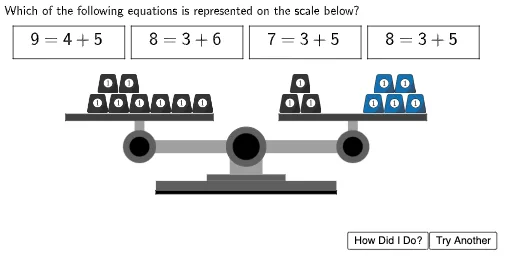
This example demonstrates how to represent equations using scales, showing how to adjust parameters to change the shape and position of the graph. Key mathematical concepts include equations, parametric curves, and function graphs. Using GeoGebra commands such as Polygon, Circle, Random, and Shuffle, dynamic geometric figures can be constructed. Suitable for high school mathematics education, particularly for learning coordinate geometry and function graphs.
GeoGebra Commands & Parameters
Polygon((2.75, 1.95), (2.75, 2.05), (8.25, 2.05), (8.25, 1.95)) → ScaleBottom1, f, g, h, iPolygon((4.3, 2.35), (4.3, 2.55), (6.7, 2.55), (6.7, 2.35)) → ScaleBottom3, n, p, q, rPolygon((5, 2.55), (5, 3.25), (6, 3.25), (6, 2.55)) → ScaleBottom4, s, t, d, ePolygon((2.75, 2.05), (2.75, 2.35), (8.25, 2.35), (8.25, 2.05)) → ScaleBottom2, j, k, l, mPolygon(Left + (0, 0.2), Left - (0, 0.2), Right - (0, 0.2), Right + (0, 0.2)) → ScaleArm, f_1, g_1, h_1, i_1Circle(Left, 0.5) → LeftArmCircle1Circle(Left, 0.3) → LeftArmCircle2Circle(Right, 0.5) → RightArmCircle1Circle(Right, 0.3) → RightArmCircle2Polygon(Left - (0.15, 0), Left + (0.15, 0), Left + (0.15, 0.8), Left + (-0.15, 0.8)) → LeftArmStand, j_1, k_1, l_1, m_1Polygon(Right - (0.15, 0), Right + (0.15, 0), Right + (0.15, 0.8), Right + (-0.15, 0.8)) → RightArmStand, n_1, p_1, q_1, r_1Polygon(Left + (-2.25, 0.8), Left + (-2.25, 1), Left + (2.25, 1), Left + (2.25, 0.8)) → LeftTray, s_1, t_1, a_1, b_1Polygon(Right + (-2.25, 0.8), Right + (-2.25, 1), Right + (2.25, 1), Right + (2.25, 0.8)) → RightTray, c_1, d_1, e_1, f_2Circle((5.5, 3.4), 0.6) → ScaleBottom5Circle((5.5, 3.4), 0.4) → ScaleBottom6Random(1, 2) → sideorderPolygon((-1.6, 6.1), (-1.6, 7.1), (1.8, 7.1), (1.8, 6.1)) → Box1, g_2, h_2, i_2, c_2Polygon((2, 6.1), (2, 7.1), (5.4, 7.1), (5.4, 6.1)) → Box2, j_2, k_2, l_2, m_2Polygon((9.2, 6.1), (9.2, 7.1), (12.6, 7.1), (12.6, 6.1)) → Box4, s_2, t_2, a_2, b_2Polygon((5.6, 6.1), (5.6, 7.1), (9, 7.1), (9, 6.1)) → Box3, n_2, p_2, q_2, r_2Shuffle({(-1.6, 7.1), (2, 7.1), (5.6, 7.1), (9.2, 7.1)}) → Points, {(9.2, 7.1), (5.6, 7.1), (-1.6, 7.1), (2, 7.1)}
AI Drawing Prompt Reference
Draw a figure with a scale disk and boxes. Start by drawing four boxes in the upper left, lower left, upper right, and lower right. Then draw a scale disk in the center. Finally, add four stands connecting the boxes and the disk.
The prompt above was compiled from the original drawing commands and is for reference only.