
Related Rates Problem: Rolling Carts
Loading the math board and drawing, please wait…
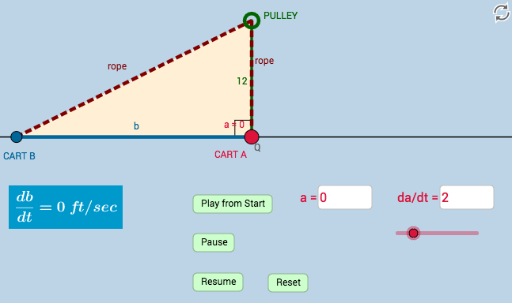
This example illustrates a related rates problem involving two rolling carts, focusing on core concepts of calculus and derivatives. Using GeoGebra commands such as Segment, Circle, and Intersect, complex geometric shapes and dynamic effects are constructed. Suitable for high school and above students learning related rates.
GeoGebra Commands & Parameters
Segment(Q, B) → gCircle(Q, a_5) → cSegment(B, A) → fCircle(B, 39 - f) → dIntersect(d, h, 1) → A_2Segment(A_2, B) → iSegment(Q, A) → aSegment(Q, A_2) → bPolygon(A_2, Q, B) → poly1, b_2, a_2, a_1Polygon(Q, A, B) → poly2, b_1, a_3, a_4Ray(A, D) → lRay(A_2, E) → mAngle(B, Q, A_2) → αTextfield(a_5) → InputBox1Textfield(n) → InputBox2
AI Drawing Prompt Reference
Draw a dynamic diagram of two rolling carts, including two circles and two line segments, and a triangle. First, draw a circle centered at Q with radius a_5, and another circle centered at B with radius 39 minus the length of segment BA. Then, draw a line segment connecting Q and B, and another line segment connecting B and A. Next, draw a line segment connecting A and A_2, and line segments connecting Q and A, and Q and A_2. Construct two triangles, one with vertices A_2, Q, and B, and another with vertices Q, A, and B. Finally, draw two rays from A and D, and from A_2 and E, and label the angle BQA_2.
The prompt above was compiled from the original drawing commands and is for reference only.