
Regular Tessellation
Loading the math board and drawing, please wait…
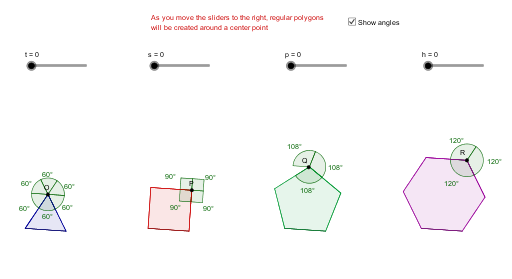
This example demonstrates how to create seamless patterns using regular polygons through plane tessellation. Key math concepts include polygon properties, symmetry, angle calculations, and geometric transformations. Construction involves commands like Point, Segment, Polygon, Mirror, and Angle in GeoGebra. Suitable for high school mathematics education to understand the principles of tessellation and applications of geometric transformations.
GeoGebra Commands & Parameters
Point(Circle[A, 1.5]) → BSegment(A, B) → bPoint(Circle[C, 1.5]) → DSegment(C, D) → cPoint(Circle[E, 1.5]) → FSegment(E, F) → dPoint(Circle[G, 1.5]) → HSegment(G, H) → ePolygon(A, B, 3) → poly1, f, a_1, b_1, IPolygon(C, D, 4) → poly2, c_1, d_1, g, h_2, J, KPolygon(E, F, 5) → poly3, e_1, f_1, i, j, k, L, M, NPolygon(G, H, 6) → poly4, g_1, R_1, h_1, l, m, n, p_1, O_1, P_1, Q_1Mirror(A, a_1) → A'Mirror(B, a_1) → B'Mirror(I, a_1) → I'Polygon(A', B', I') → poly1', i', a', b'Mirror(A', b') → A''Mirror(B', b') → B''Mirror(I', b') → I''Polygon(A'', B'', I'') → poly1'', i'', a'', b''Mirror(A'', a'') → A'''Mirror(B'', a'') → B'''Mirror(I'', a'') → I'''Polygon(A''', B''', I''') → poly1''', i''', a''', b'''Mirror(A''', b''') → SMirror(B''', b''') → TMirror(I''', b''') → UPolygon(S, T, U) → poly5, u, s_1, t_1Mirror(S, s_1) → S'Mirror(T, s_1) → T'Mirror(U, s_1) → U'Polygon(S', T', U') → poly5', u', s', t'Mirror(C, d_1) → C'Mirror(D, d_1) → D'Mirror(J, d_1) → J'Mirror(K, d_1) → K'Polygon(C', D', J', K') → poly2', c', d', j', k'Mirror(C', j') → C''Mirror(D', j') → D''Mirror(J', j') → J''Mirror(K', j') → K''Polygon(C'', D'', J'', K'') → poly2'', c'', d'', j'', k''Mirror(C'', d'') → C'''Mirror(D'', d'') → D'''Mirror(J'', d'') → J'''Mirror(K'', d'') → K'''Polygon(C''', D''', J''', K''') → poly2''', c''', d''', j''', k'''Mirror(E, i) → E'Mirror(F, i) → F'Mirror(L, i) → L'Mirror(M, i) → M'Mirror(N, i) → N'Polygon(E', F', L', M', N') → poly3', e', f', l', m', n'Mirror(E', m') → E''Mirror(F', m') → F''Mirror(L', m') → L''Mirror(M', m') → M''Mirror(N', m') → N''Polygon(E'', F'', L'', M'', N'') → poly3'', e'', f'', l'', m'', n''Mirror(G, l) → G'Mirror(H, l) → H'Mirror(O_1, l) → O'Mirror(P_1, l) → P'Mirror(Q_1, l) → Q'Mirror(R_1, l) → R'Polygon(G', H', O', P', Q', R') → poly4', g', h', o', p', q', r'Mirror(G', p') → G''Mirror(H', p') → H''Mirror(O', p') → O''Mirror(P', p') → P''Mirror(Q', p') → Q''Mirror(R', p') → R''Polygon(G'', H'', O'', P'', Q'', R'') → poly4'', g'', h'', o'', p'', q'', r''Point(poly1) → OPoint(poly2) → PPoint(poly3) → QPoint(poly4) → RAngle(A, U', B) → αAngle(K''', J''', D) → βAngle(N, M'', L') → γAngle(O'', P'', O') → δAngle(B, U', A'') → εAngle(A'', U', B''') → ζAngle(B''', U', S) → ηAngle(S, U', T') → θAngle(T', U', A) → ιAngle(D, J''', K'') → κAngle(K'', J''', D''') → λAngle(D''', J''', K''') → μAngle(L', M'', N'') → νAngle(N'', M'', L'') → ξAngle(O', P'', Q'') → οAngle(Q'', P'', O'') → ρ
AI Drawing Prompt Reference
Create a seamless pattern using a regular triangle, square, pentagon, and hexagon. Start by drawing circles with radius 1.5 centered at A, C, E, and G, then pick points B, D, F, and H on these circles and connect them to form regular polygons. Use the mirror command to reflect each polygon and its vertices to symmetric positions, and repeat this process multiple times to form a seamless pattern of regular polygons.
The prompt above was compiled from the original drawing commands and is for reference only.